
Here in CleanTalk we work remotely from more than ten countries and nine timezones across the whole of the world. In order to collaborate and communicate as a team, we follow some rules and use various online tools. I’m going to share details how does it work for us. But first, let me start with a brilliant message that I totally support,
“Great things in business are never done by one person. They’re done by a team of people.”
— Steve Jobs
Communications
We use a few channels to speak, text and virtual meet each other. I divide all communications by three categories – quick, daily and projects. Also, I sure that for the remote work, communications is half of job. It’s really important to be in touch during working day, even it is not an office.
Quick chats, texts and voices
We use Matrix + Element as a corporate messenger. Matrix is more info about this network.
Matrix is a decentralized communication platform that provides several advantages for remote work. One of its main benefits is decentralized communication, which allows organizations to host their own servers and maintain full control over their data. Matrix also offers strong privacy and end-to-end encryption, helping teams protect sensitive conversations and shared files. Another important advantage is interoperability, as Matrix can connect with other platforms through bridges, allowing communication across different messaging systems. It also supports real-time collaboration, including group chats, direct messages, file sharing, and voice or video calls. Because Matrix is open-source and customizable, teams can adapt it to their workflows and integrate it with internal tools. Overall, Matrix provides vendor independence and flexibility, making it a reliable communication solution for distributed teams.
This combo gives pros such as,
- End-to-end encrypted private and team chats.
- Voice and Video meetings. Private and team, both works.
- Threads as in Slack. Which helps focus people sharing data by topics, even in quick chats.
It is a self-hosted solution, so as cons you have to run own infrastructure for Matrix.
As well as, we use Google meet for meetings. This app is great – video, voice, window/screen presentation work among all devices, integration with Google Calendar. Built-in function of sharing page, window or screen almost replaces face-to-face meeting.
Daily communications
I mean communications that require response in a business day. What we have over here,
- Emails to serve customers and contact with third-parties. We bought license of Google Workspace, this thing is powerful – Emails, contacts, files sharing, meetings, but expensive. They increase fee per seat a few times per year. As I recall, we started with $6-7/month/seat a few years ago, now it is $11.97/month/seat…ridiculous and greedy.
- Project and task management we run of course in doBoard. This is our in-house built app, we released first version a year ago and moved there all tasks from Basecamp 2. By now, it starts $5/month/5GB with unlimited seats, projects and tasks. Everything unlimited except the storage.
Google Workspace provides a complete set of cloud-based tools that make remote work simple and efficient. Team members can access email, documents, and files from anywhere using tools like Gmail, Google Drive, Docs, Sheets, and Slides. Real-time collaboration allows multiple people to work on the same document simultaneously, reducing the need to send files back and forth. Integrated communication tools such as Google Meet, Google Chat, and Google Calendar help teams stay connected and easily schedule meetings. Shared cloud storage keeps company files organized and accessible while allowing administrators to manage permissions and security. Overall, Google Workspace helps remote teams collaborate faster, stay organized, and maintain productivity regardless of location.
Meetings
99% of meetings are remote and we do it a few times per week in each team and once a week per whole company.
- The idea of team meetings to chat about coming daily tasks and/or challenging tasks. We do our best to run a daily meeting not more than 15 minutes, but it depends on a team size. As bigger team as more time for a meeting.
- Weekly company’s meeting goes exactly one hour. This time interval is fine to discuss some new ideas and plans for the upcoming week. So, yes, in that meeting we discuss ideas and plans, usually we have 2–3 ideas and 15–20 minutes for plans. The agenda is forms by anyone in the company.
Google Meet has to use tool for the company’s meeting, team meetings we run in Matrix as well.
Google Calendar is another must use app. It goes as part of Google Workspace, has ability to schedule meetings across the all timezones with adjustment time of meeting to locale time of each participant, which is really cool! Also, it shows holidays per location which helps to plan meetings as well.
Task management
We have six teams and four extensively developed projects. Most of the teams work by Scrum framework, which means backlogs, estimations, sprints and retrospectives. Some teams have projects, but do not follow Scrum neither any other frameworks, they just maintain tasks in a project. Run this project forever by adding new tasks and closing solved. I personally call such projects and as infinite.
Scrum provides a structured framework that helps stay organized and be productive while working remotely from different locations. One of its key benefits is clear task organization, where work is divided into short sprints with defined goals and priorities. Scrum also improves team communication through regular meetings such as daily stand-ups, sprint planning, and retrospectives. Another advantage is transparency and visibility, since all tasks and progress are tracked in a shared backlog or task board that everyone can access. The framework encourages continuous improvement, allowing teams to review results after each sprint and adjust their workflow. Scrum also supports faster delivery of results, because teams focus on small, manageable tasks that can be completed within short development cycles. Overall, Scrum helps remote teams stay aligned, collaborate effectively, and deliver work more consistently.
Anyway, all our projects we run in doBoard. As a disclaimer, I have to say this is our in-house developer project/task management system with focus on core features like – projects, to-do lists, tasks and comments.
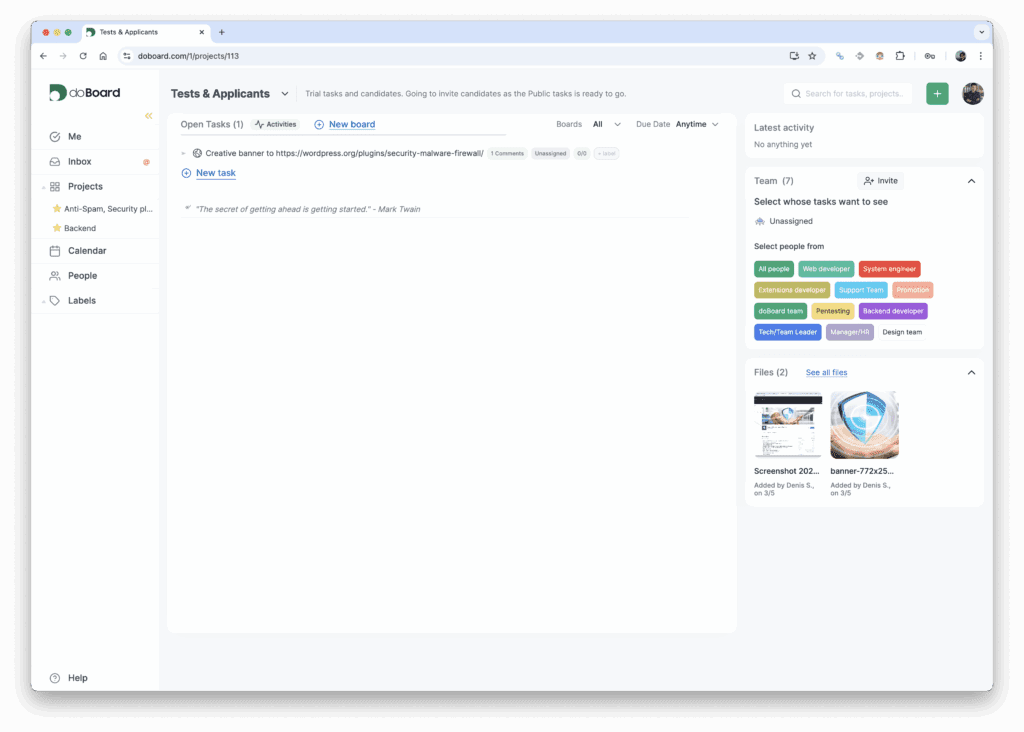
I’ve already done an article how to run scrum in doBoard I hope it may be used as good example to start with.
Reports and text communications
First, we have a duty report. It means that a team member message in group chat that he/she is on duty for today. This report is needed just to say everybody who is in a charge for a particular team. It helps to get quick response about some specific detail in an app, database, customer or a policy. Also, it means that this person today is in charge of emergency cases. So, if some part of www.doboard.com is not working, everybody inside the company know who to call.
Second, each of us report at least twice per week by email to whole company. We call it the Daily report. This thing is necessary to tell people what is going on in time frame of two-free days, which tasks have been solved or not, what kind of issues happened, new ideas to share and share plans for the next few days. The last part is really important, because synchronizes team in case of parallel task.
Third, text communications are divided per team or/and project. For example,
- Backend team,
- Support team,
- Web apps team,
- Support team,
- All crew,
- and etc.
Which helps focus people on really important messages, connected to specialization and do not make mess sending information to wrong, unaffiliated recipients in the company.
Offices vs Remote work
We have physical offices and use the for meetings with third parties or face-to-face meetings a few times per year. As well as we do our best to meet teammates just for fun and joy, to spend a few days together, as we did in 2024 last time.

Recommended tools stack in 2026
As you get, everything described above is done remotely and out of the office! Is this effective in comparison to office work? I believe it depends on product that company produces, personal preferences of crew members and company’s inside environment. For us, definitely yes!
Bottom line how to manage remote team in 2026,
- A chat app for quick texts and voices.
- Emails to communicate with customers, suppliers and other third-parties.
- Project management/CRM system to manage data and tasks.
- Online tools to show your work via sharing apps and screens.
- Two reports weekly per each team member.
- Avoid group meetings more than one hour.
“Coming together is a beginning, staying together is progress, and working together is success.”
— Henry Ford