
Small Business Project Management: A Practical Guide to Getting Projects Done
Small Business Project Management: A Practical Guide to Getting Projects Done
Most small businesses don’t struggle because they lack good ideas. They struggle because the execution falls apart. Unclear who owns what. Priorities that shift mid-sprint. Work that lives in someone’s inbox or memory instead of somewhere the whole team can see it.
When you’re running a small team, there’s very little slack to absorb chaos. A missed handoff costs real money. A launch that gets rushed means weeks of cleanup. And when the same problems repeat (scope that quietly expands, deadlines that surprise everyone, team members who feel constantly behind), that’s usually a sign that project management is missing, not that the people are.
This guide is a practical introduction to small business project management: a lightweight approach built around a four-stage project life cycle, two real-world examples, and a set of habits you can actually sustain without hiring a dedicated PM.
Why small businesses skip project management
The reasons feel rational in the moment:
• “We’re too small for that.”
• “We don’t have time to plan.”
• “We tried a tool once, nobody used it.”
• “That’s corporate overhead, not us.”
There’s also a persistent misconception that project management means Gantt charts, status meetings, and elaborate documentation. For small teams, it doesn’t have to. Good project management for a small business is mostly about removing confusion so the team can focus on the work instead of constantly negotiating what the work even is.
When PM is missing, the costs tend to show up in familiar ways:
If you’ve ever said “I thought someone else was handling that,” you’ve already felt the problem that lightweight PM solves.
What project management actually means
At its core, small business project management is the practice of turning a goal into an execution system. It’s answering a handful of questions before work begins, rather than stumbling over them mid-project:
You don’t need software to answer those questions. You do need to write the answers somewhere your team can find them.
The project life cycle for small businesses
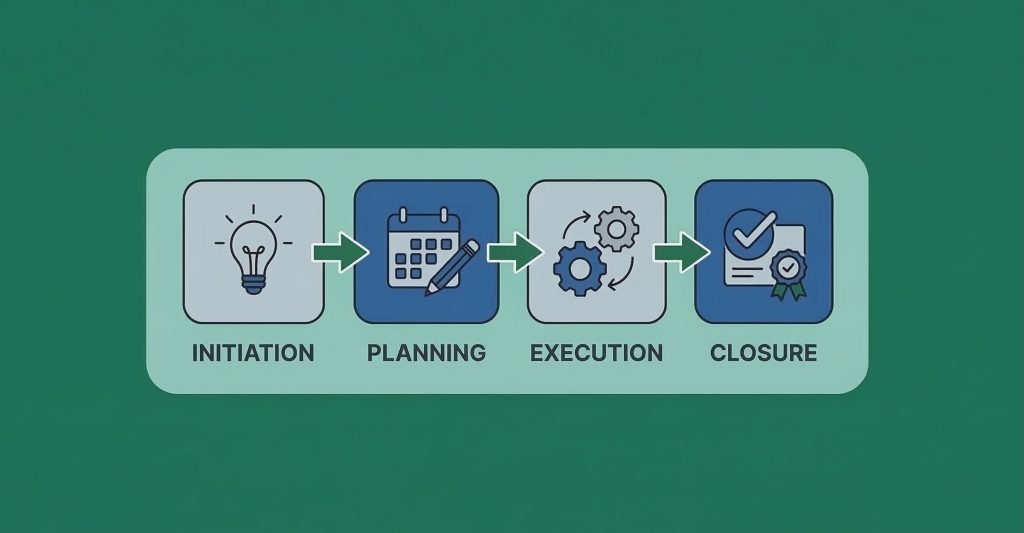
Below is a simple four-stage framework that works for almost any project, from launching a new service to rebuilding a website. Each stage has a clear purpose and a handful of decisions that matter most.
Stage 1: Initiate the project
Initiation is where you set the foundation. You’re not building tasks yet. You’re agreeing on what the project is, why it matters, and who’s accountable.
The questions worth asking up front:
In a small business, initiation can be a 30-minute conversation.
The goal is to end that conversation with a shared understanding, written down in one place, so it doesn’t get reinterpreted later.
Stage 2: Make a plan
Planning isn’t about building a perfect schedule. It’s about reducing guesswork so execution doesn’t turn into a daily negotiation.
A useful plan for a small business team usually includes:
One element that’s easy to skip but matters: risk planning. For each project, listing three to five things that could go sideways and defining a basic response changes how your team handles surprises. The goal isn’t to predict everything. It’s to avoid being caught completely flat-footed when something (inevitably) shifts.
Stage 3: Execute and complete tasks
This is where the work actually happens. Your job during execution is to keep progress visible and keep the team unblocked.
Two things cause execution to go wrong in small teams more than anything else: unclear ownership and unclear priorities. The fix is straightforward. Assign one owner per task, add a due date, and review progress on a predictable cadence.
A short update format that works well for small teams:
– Done: what got completed
– Next: what’s being worked on now
– Blocked: what can’t move forward without help
– Decisions needed: things that require a call from someone with authority
During high-pressure periods (a launch week, a renovation, a go-live), daily check-ins can replace weekly ones. What matters is that the rhythm is predictable enough that problems surface before they become crises.
Stage 4: Close the project
Closing is easy to skip, especially when a project goes well. But this stage is how small businesses improve over time without expensive outside help.
Closing a project means:
Even a 20-minute retrospective covering what worked, what didn’t, and what you’d do differently is enough to build the kind of institutional memory that makes the next project go more smoothly.
Example 1: A WordPress agency delivering a client website
Agency projects have a different kind of complexity: client feedback loops, scope creep, approval delays, and delivery quality under a fixed deadline.
Context: A small WordPress agency (4–7 people) is rebuilding a client site. The client wants a modern design, faster pages, lead form tracking, and a clean handoff so they can manage content without breaking layouts.
Success metrics:
Initiate: The agency runs a kickoff that produces a written definition of done. Goals, constraints, and scope boundaries are agreed before design begins. The revision limit is set. Post-launch requests are identified and deferred explicitly, not informally.
Plan: The milestones follow the natural workflow:
Roles are explicit. The PM owns scope, timeline, and client communication. The designer owns the UI and design system. The developer owns the build, integrations, and performance. QA owns the test checklist and bug tracking.
The risk plan focuses on the usual agency pain points: delayed client feedback, late content delivery, plugin conflicts, and scope creep after approvals. The team sets a change rule before the project starts: any new request goes into a change log and is accepted only with a tradeoff decision, not absorbed silently.
Execute: The PM enforces two habits. Requests go into the backlog, not into scattered emails. Approvals happen at the agreed milestones, not “whenever the client has a moment.”
Close: Closing is a structured handoff. Forms are tested, tracking is verified, redirects are live, and backups are ready. The client signs off on a final checklist. A short retrospective captures what created rework. Access, documentation, and maintenance recommendations are delivered cleanly.
Example 2: A bakery opening a second location
Opening a second location is one of the higher-stakes projects a small business can take on. It’s time-constrained, heavily dependent on external vendors, and easy to let slip into chaos.
Context: A neighborhood bakery with 10 employees is opening a second shop across town. The owner wants to open on a fixed date, avoid disrupting the original store, and have the new location running smoothly within the first month.
Success metrics:
Initiate: The owner runs a 30-minute kickoff that produces a short written answer to the key questions: opening date, target revenue by month two, what “ready” means, and who’s accountable for each part of the project. Crucially, they also define what’s not in scope for opening day. Adding a full espresso bar, for example, gets pushed to month two.
Plan: The milestones are relatively straightforward:
Each milestone has one owner. The store manager owns staffing and training. The head baker owns the production plan for two locations. One person owns vendor coordination. The contractor owns renovation and inspection scheduling.
The risk plan focuses on the two most common delays: permit timelines and equipment delivery. If permits slip, the team advances with hiring and training materials. If equipment is delayed, they’ve already identified rental alternatives.
Execute: The project owner holds one firm rule: when something changes, the team agrees on the tradeoff before moving forward. The project doesn’t absorb surprises silently.
Close: Opening day isn’t the finish line. Closing means confirming that equipment is tested, payments are working, inventory is stocked, and staff are scheduled. The owner signs off on a written checklist. A short debrief captures what should be templated for the next location. Operations formally transfer to the store manager, and project work ends.
The project management triangle: how to handle scope creep
Scope creep is one of the most common and costly problems in small business project management, and it usually doesn’t show up as a dramatic demand. It shows up as a small additional request. “While you’re at it, can you also…” is how it starts.
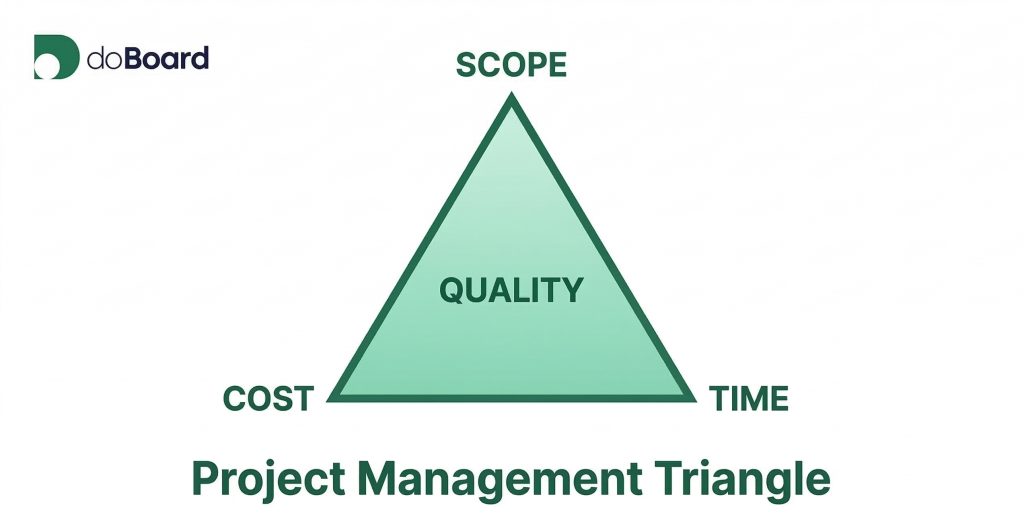
The cleanest way to handle it is to understand what’s sometimes called the triple constraint: every project is bounded by scope, time, and cost. These three variables are interconnected, and quality is what you’re trying to protect across all of them.
Change one variable, and at least one of the others has to move to compensate. Add scope without adjusting the timeline or budget, and quality suffers. Cut the budget without reducing scope, and the timeline stretches or the work gets rushed. The triangle doesn’t lie: you can’t get more for the same time and money. You can only decide which side of the triangle absorbs the pressure.
How to use this in practice:
When a new request appears mid-project, don’t evaluate it in isolation. Ask: If we add this, what changes? The answer is usually one of three things:
The fourth option, adding scope while holding time, cost, and quality constant, is rarely realistic. Making that visible to clients and stakeholders isn’t confrontational. It’s just honest.
A simple question that keeps these conversations calm: “We can add that. Do you want to extend the timeline, adjust the budget, or remove something else from scope?” This reframes the conversation from a refusal to a decision, and it puts the tradeoff where it belongs: with the person asking for the change.
Identifying the critical path
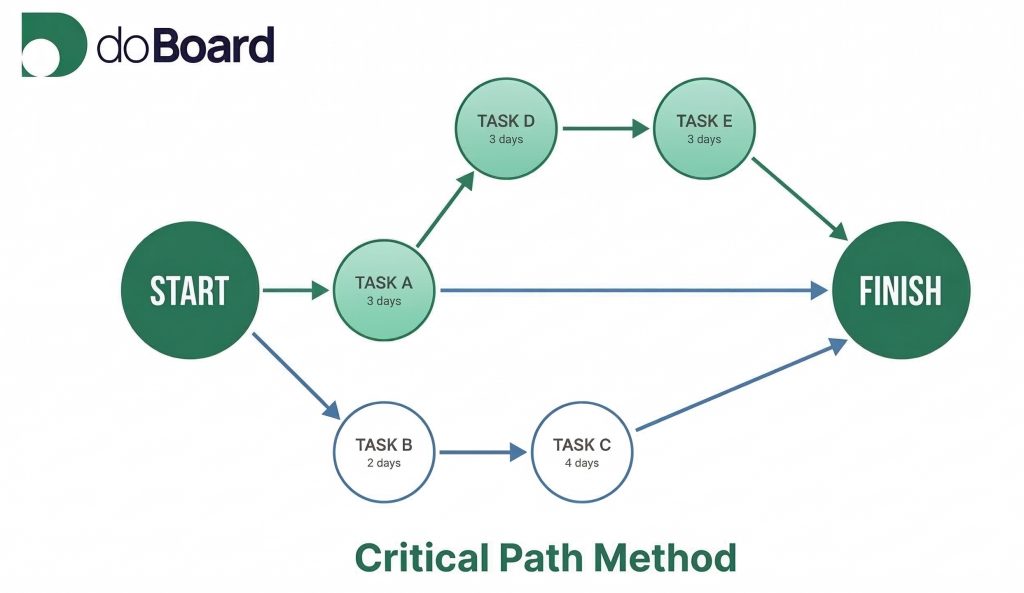
Some projects have a few tasks that determine the finish date. If any one of them slips, the whole project slips regardless of how well everything else is going. That sequence of tasks is called the critical path.
Understanding your critical path means knowing which tasks have zero flexibility (where any delay has a direct, one-to-one impact on the end date) versus which tasks have float, also called slack. Float is a small buffer that allows a task to slip a few days without affecting the overall timeline. Knowing which tasks have it, and which don’t, changes how you assign priorities and respond to surprises.
How to find it without a scheduling tool:
That longest sequence is your critical path. The tasks on it have zero float.
Tasks not on that path have some room to shift without pushing the end date.
In the bakery example, the critical path likely runs: permits, then renovation, then inspection, then equipment installation. A permit delay doesn’t just push that one milestone — it pushes everything downstream. Recognizing that early means the owner can proactively prepare alternatives (such as pre-selecting a rental equipment option) rather than discovering the problem two weeks before opening.
In the agency example, the critical path usually includes design approval, content readiness, QA, and client signoff. If the client is slow to approve design, that delay doesn’t stay isolated. It pushes the final delivery date by the same amount, compressing every stage that follows with no buffer to absorb it. Knowing this is why experienced project managers build explicit review deadlines into the contract, not just delivery deadlines.
You don’t need complex software to work this out. A simple task list with dependencies and duration estimates is enough to identify which tasks you can’t afford to let slip.
Best practices for small business project management
These aren’t rules. They’re habits that reduce the kind of confusion that makes small teams feel perpetually behind.
Start every project with a written definition of done. One paragraph. Include success metrics and what’s out of scope. This document pays for itself the first time someone tries to add something after kickoff.
Break work into small, assignable tasks. If a task takes more than a few days, split it. Large tasks create the “almost done” limbo that makes progress invisible.
One owner per task. Multiple owners usually means no owner. Collaboration is fine. Accountability needs to be singular.
Use milestones instead of trying to schedule everything. Five to ten milestones with owners and target dates is a more practical plan than a detailed day-by-day schedule that gets outdated immediately.
Keep communication consistent, not constant. One weekly review is enough for most projects. Short daily check-ins during high-stakes periods. What matters is that the cadence is predictable.
Protect capacity. Small teams burn out when projects ignore the reality of how much time people actually have. Even rough estimates help. If someone is overloaded, the plan is wrong — not the person.
Close every project, even the successful ones. A 20-minute retrospective and a written summary is how a small business builds institutional knowledge without external consultants.
Quick-start checklist for your next project
If you want to apply lightweight small business project management immediately, here’s a starting point for any project:
The right tools make this easier
Small business project management doesn’t require a complex system, but having the right tool helps enormously. The goal is visibility: can everyone on your team see what’s being worked on, who owns it, and what’s the dependency between the tasks?
doBoard is built specifically for small business teams. It keeps projects organized without the complexity of enterprise tools, with easy and customizable planning, task ownership, and team communication in one place and no steep learning curve to climb first.
If you’re ready to move from scattered updates and repeated surprises to a system your whole team actually uses, see how doBoard works for small businesses.
Or just start with a 7-day free trial to see for yourself. No credit card required. Get set up in minutes.