
doBoard vs Basecamp
Best Basecamp Alternative in 2026: doBoard
doBoard is a Basecamp alternative without project limits: $5/month for unlimited users, projects, and tasks.
Time tracking, sprint planning, and Planning Poker are included on every plan. No add-ons, no hidden fees.
Unlimited users. Unlimited projects. Unlimited tasks.
- Tasks, Dashboards & Projects
- Time tracking
- Sprints & estimates
- Calendar & Timezones
- Automated Due Dates
- Customizable labels
Monthly price for 20 people, 10 active projects
Unlimited users and projects, time tracking included
10 active projects, no time tracking
Adds time tracking, up to 25 active projects
$5 covers it all.
Pay $5/month; upgrade only if you need more than 5 GB of storage.
Short answer
doBoard is the best Basecamp alternative for teams that run into Basecamp’s project limits or need time tracking without moving to the $99/month plan. It costs $5/month for unlimited users, projects, and tasks, with time tracking, sprint planning, and Planning Poker on every plan. Basecamp stays the better fit for teams that mainly need message boards, check-ins, and client updates.
4/5 from WP Mayor. 5/5 from a Trustpilot reviewer who left Basecamp. Built by CleanTalk after seven years on Basecamp.
Quick comparison
doBoard vs Basecamp at a glance
| Category | doBoard | Basecamp |
|---|---|---|
| Price | From $5/month for unlimited users and projects | $25 to $299/month, no per-user fees; free plan with 1 project |
| Active projects | Unlimited on every plan | 3, 10, or 25 depending on the plan; unlimited only at $299/month |
| Time tracking | Included on every plan | Only on Pro ($99/month) and Unlimited ($299/month) |
| Sprints and Planning Poker | Built in | Not available on any plan |
| Free trial | 7 days, no credit card required | 30 days (45 on Unlimited), no credit card required |
Why doBoard
Why choose doBoard: a clear Basecamp alternative
Up to 60x more affordable than Basecamp
Basecamp charges by the number of active projects: $25/month for 3 projects, $59 for 10, $99 for 25, and $299 for unlimited. doBoard is $5/month for all of it: unlimited users, projects, tasks, and a separate company space for every client.
Explore doBoard pricing →Lightweight Agile tools, ready in a minute
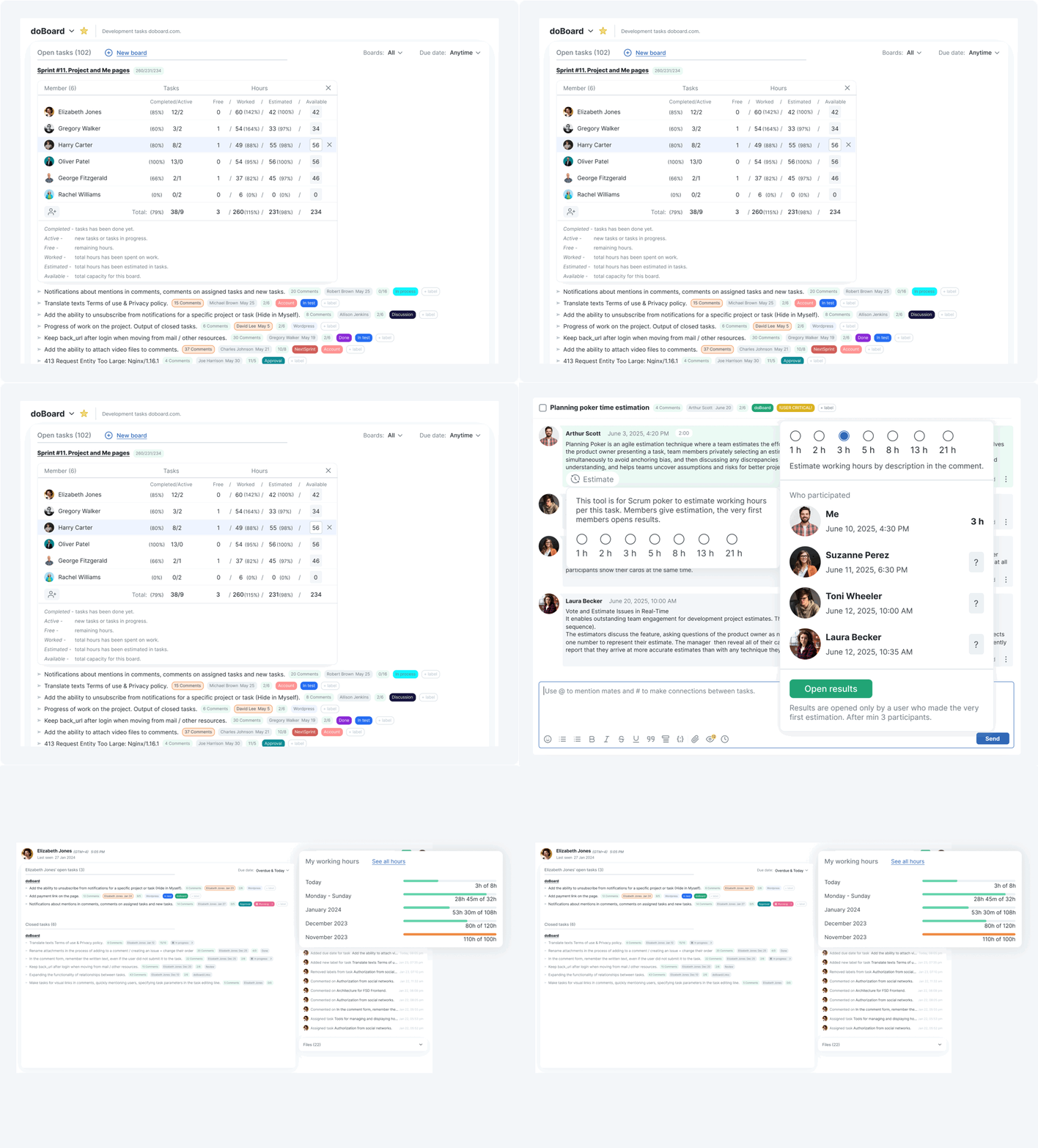
Set estimates, plan sprint capacity by teammate, and run Planning Poker for team estimation. All built in, no add-ons, no separate setup. Basecamp does not include dedicated sprint planning, estimation, Planning Poker, or capacity planning on any plan.
See more about Agile features in doBoard →Time tracking included on every plan
Log time directly in tasks, compare planned vs actual hours, and review worked hours by teammate or project. In Basecamp, time tracking is available only on Pro ($99/month) and Unlimited ($299/month, billed annually).
See more about time tracking in doBoard →Work stays in tasks, not buried in chat
In Basecamp, decisions and updates can easily get scattered across Pings and message threads. In doBoard, every comment, decision, and time entry lives inside the task, board, or project it belongs to so nothing gets lost.
Explore how work is organized in doBoard →Who it’s for
Is doBoard a good Basecamp alternative for your team?
doBoard is built for teams that need more than Basecamp offers out of the box: built-in time tracking, workload planning, Agile tools, and flexible workflow customization, all for unlimited users at a price that does not grow with headcount. A strong fit for remote and async teams too. Here is who gets the most out of it.
Small and mid-sized teams tired of per-seat pricing
doBoard is an affordable Basecamp alternative starting at $5/month for unlimited users. Price grows only with storage, never with headcount.
See how doBoard helps small teams →Agencies and consultancies managing multiple clients
Separate Companies under one account for each client, brand, or business unit, with their own projects, boards, people, access settings, and time logs. No extra accounts or seats needed.
Learn more about doBoard’s multi-company structure →Teams that want a tool that adapts to their workflow
Custom labels, tag groups, and workflow stages let you organize work your way without switching to a more complex tool.
Learn how labels work in doBoard →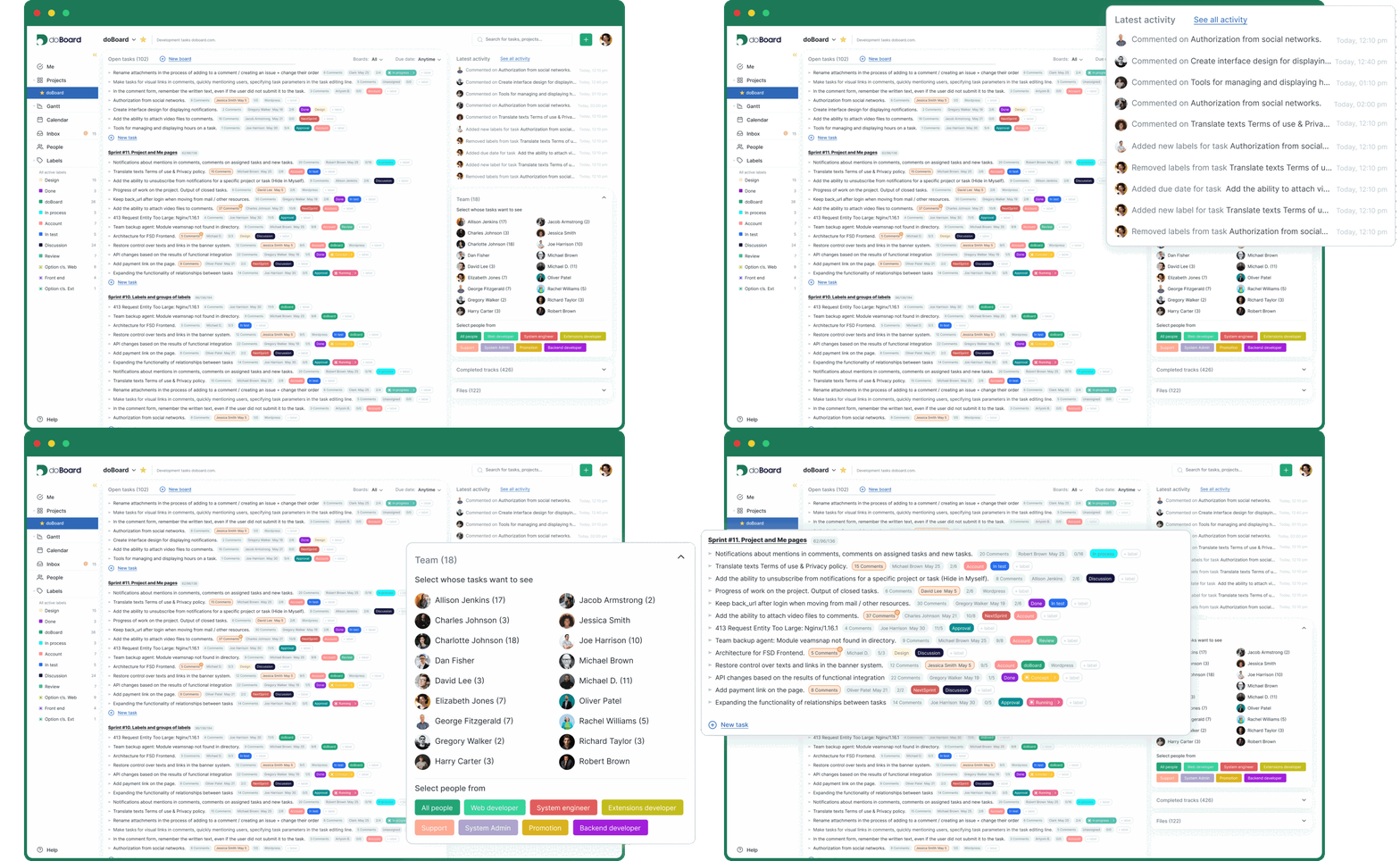
Remote and distributed teams
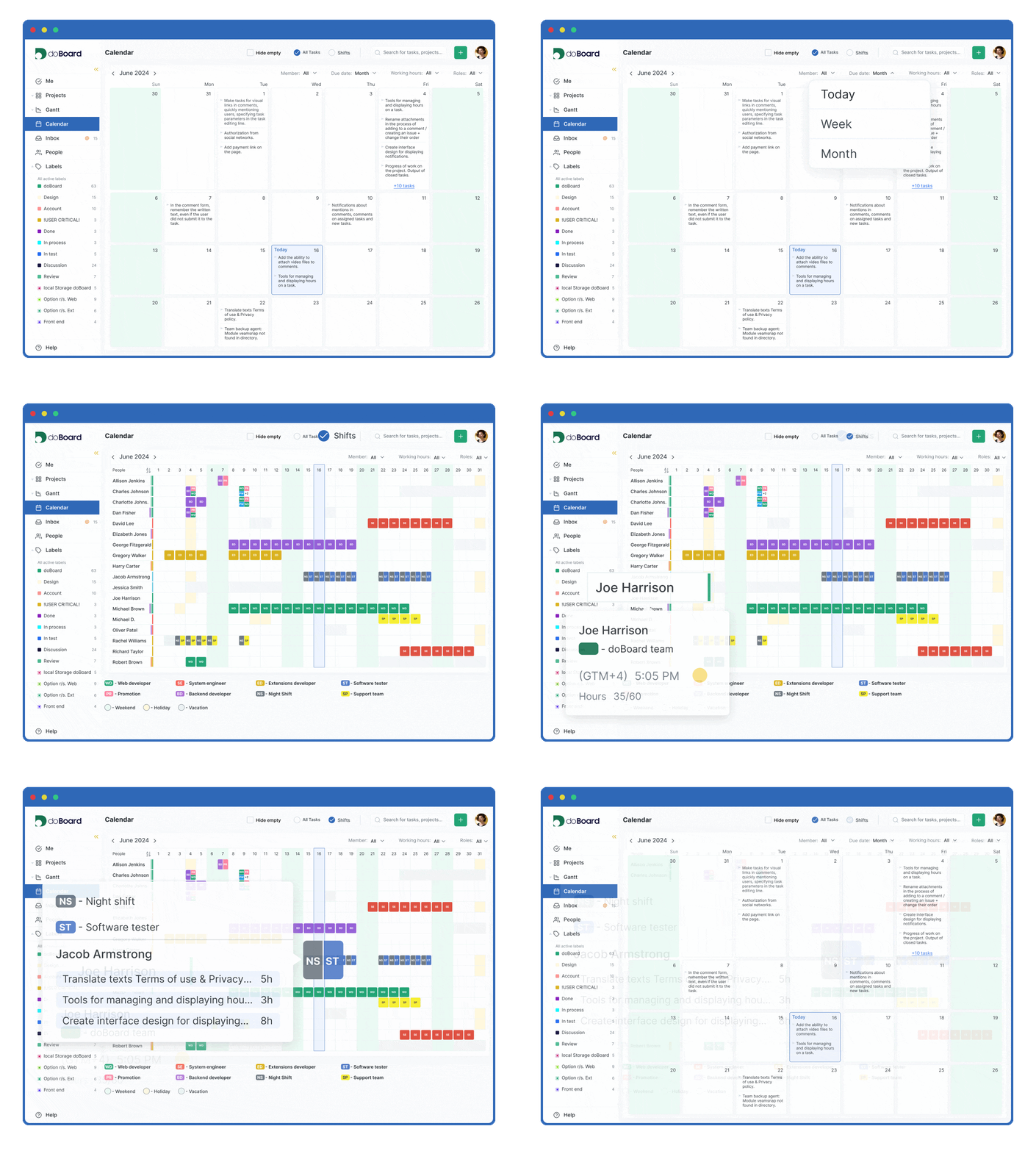
A practical Basecamp alternative for remote teams: calendar shows availability across time zones, all task context stays in one place so async work runs smoothly.
Teams that need time tracking, workload and capacity planning
Task-level time tracking, team calendar, and capacity planning by teammate, all included on every plan with no add-ons.
Learn how workload planning and time tracking work in doBoard →Teams that work in Agile or iterative workflows
Sprint planning, backlog boards, task estimates, and Planning Poker, all built in. A stronger fit than Basecamp for teams that plan work in sprints.
Learn how sprint planning works in doBoard →Development teams
GitHub integration keeps code and tasks connected. Web teams also get Spotfix, built-in website feedback that turns client comments into tasks.
Full comparison
doBoard vs Basecamp comparison: features and pricing
Basecamp and doBoard both skip per-seat pricing, but they charge for different things. Basecamp prices its plans by the number of active projects and storage, and adds time tracking only from $99/month. doBoard gives every plan unlimited users, projects, and tasks, and grows only if you need more storage. The table below compares doBoard and Basecamp side by side on features, pricing, and key differences so you can decide which project management tool fits your team.
| Category | doBoard | Basecamp |
|---|---|---|
| Price | $5/month for everything. The price grows only with storage: 5 GB — $5, 20 GB — $15, 75 GB — $50, 250 GB — $150, 750 GB — $300 | $25 to $299/month, by number of active projects: 3 — $25, 10 — $59, 25 — $99, unlimited — $299 (billed annually). Free plan: 1 project |
| Users and seats | Unlimited users on every plan. Adding teammates does not increase the price | Free: up to 5 users. Freelancer: up to 20 users. Studio, Pro, and Unlimited: unlimited users. Clients, contractors, and guests count as users |
| Projects and tasks | Unlimited projects, boards, and tasks on every plan | Active projects are capped by plan: 1 (Free), 3 (Freelancer), 10 (Studio), 25 (Pro), unlimited (Unlimited). Archived projects do not count. Tasks are organized in to-do lists and Card Tables |
| Storage | 5 GB on the $5 plan, up to 750 GB on higher tiers | 1 GB (Free), 5 GB (Freelancer), 25 GB (Studio), 100 GB (Pro), 1 TB (Unlimited) |
| Client workspaces / company structure | Separate Companies under one account for different clients, brands, or business units, with their own projects, boards, people, access settings, and time logs. | Clients can be invited to projects with project-level visibility controls. They count toward the user limit on Free and Freelancer. No separate Company layer for managing multiple client workspaces under one account. |
| Time tracking | Built in on all plans. Team members log hours directly in tasks. Each task shows estimated hours and actual hours worked. Reports available by task, teammate, project, and date range | Included only on Pro ($99/month) and Unlimited ($299/month). Not available on Free, Freelancer, or Studio |
| Agile and sprint tools | Sprints, backlog boards, time estimates, sprint capacity planning by teammate, and Planning Poker for team estimation. All included, no add-ons needed | No dedicated sprint planning, team estimation, Planning Poker, or sprint capacity planning on any plan. |
| Labels and workflow | Customizable labels and tag groups. Labels can represent priority, status, task type, or any category the team needs. Tag groups move tasks through defined workflow stages | Basic status and color labels. Limited workflow customization |
| Task relationships | Tasks can be linked across different projects. Related tasks, mentioned tasks, and cross-project connections are visible inside each task | Supports subtasks, but no structured task dependency tracking or cross-project task relationship view. |
| Capacity planning | Team calendar shows who is working, on vacation, or on duty. Task calendar shows each teammate’s planned tasks and remaining available hours for the day or week | Schedule view shows upcoming tasks. Lineup shows project timelines. No available hours or workload tracking per person |
| Timeline and Gantt | In development | Hill Charts show general project progress as a curve. No task-level Gantt chart |
| Deployment | Cloud-hosted. Self-hosting available in Beta | Cloud only |
| Free plan and trial | No free plan. 7-day free trial with every feature, no credit card required | Free plan with 1 project for up to 5 users. 30-day free trial on paid plans (45 days on Unlimited), no credit card required |
For teams looking for a Basecamp alternative with built-in time tracking and Agile tools, doBoard covers the full project management workflow at a fraction of the cost. Basecamp Freelancer and Studio are a reasonable fit for small teams that run only a few projects at a time and don’t need time tracking or sprint planning. Basecamp Pro and Unlimited add time tracking, but still do not include dedicated sprint planning, team estimation, Planning Poker, or team capacity planning.
If you need software like Basecamp but with lightweight Agile, built-in time tracking, and a flat price that doesn’t grow with your projects or your team, doBoard is the stronger fit.
7-day free trial. No credit card required.
Basecamp pricing and feature information is based on publicly available data from basecamp.com/pricing and independent review sources including Capterra and G2. Prices and plan details may change and can vary by region. Always verify current pricing directly with the vendor before making a purchasing decision. Last checked: .
Pricing
Team cost examples
5 people, 3 projects
$5/mo doBoard, 5 GB
- Basecamp Freelancer:$25/mo
- With time tracking: Basecamp Pro$99/mo
20 people, 10 projects
$5/mo doBoard, 5 GB
- Basecamp Studio:$59/mo
- With time tracking: Basecamp Pro$99/mo
50 people, 30 projects
$5/mo doBoard, 5 GB
- Basecamp Unlimited:$299/mobilled annually
- Time tracking: included
doBoard pricing scales only by storage. Users, projects, and tasks are unlimited.
Need more space? Our pricing stays simple. doBoard next tiers are $15/mo for 20 GB, $50/mo for 75 GB, $150/mo for 250 GB, and $300/mo for 750 GB. You still get unlimited users and projects.
7-day free trial. No credit card required.
Switching
Why teams leave Basecamp and switch to doBoard
Basecamp prices grow with your number of projects
Basecamp’s plans are priced by how many projects can be active at once: 3 on Freelancer ($25/month), 10 on Studio ($59/month), 25 on Pro ($99/month). Once you need more, the next step is Unlimited at $299/month, billed annually. Freelancer also caps the account at 20 people, and clients and contractors count toward that limit.
doBoard charges $5/month for unlimited users and unlimited projects, so your price stays the same whether you run 3 projects or 300.
Time tracking starts at $99/month in Basecamp
Basecamp’s Free, Freelancer, and Studio plans don’t include time tracking. Teams that need to log hours have to move to Pro at $99/month or Unlimited at $299/month, billed annually.
doBoard includes time tracking on every plan, with per-task time logs, estimated vs actual hours, and reports by teammate, project, and date range.
Basecamp has no dedicated sprint tools
Basecamp has no built-in sprint planning, estimation, Planning Poker, or capacity planning. Teams that need sprint estimates or capacity by teammate have to use a separate tool alongside Basecamp.
doBoard includes lightweight sprint planning, task estimates, and Planning Poker for collaborative effort estimation, all built in at no extra cost.
Important updates get lost in message threads and Pings
Basecamp is built around group chat, message boards, and Campfire, its built-in team chat. Over time, task-related decisions and updates can easily get scattered across threads and become difficult to trace back.
In doBoard, every comment, time entry, status update, and attached file lives inside the task, board, or project it belongs to, so context is always in one place and nothing gets lost as the project moves forward.
Limited dependency tracking
Basecamp now supports subtasks and simple references between related items, which is useful for basic task organization. But it still does not provide structured dependency management, cross-project task relationship views, or workload-based planning for complex delivery workflows.
doBoard supports cross-project task links, estimates, time logs, and capacity planning, so related work stays connected across boards and projects.
Limited task customization kills flexibility
Basecamp keeps projects simple with built-in tools like to-do lists, message boards, schedules, files, and Card Tables. But it gives teams less flexibility for custom task statuses, priority levels, workflow stages, and delivery-specific labels.
doBoard lets you create custom labels and tag groups that represent your own priorities, statuses, and task types, so the tool adapts to your process rather than the other way around.
Our story
Why we built doBoard: seven years on Basecamp
doBoard started inside CleanTalk. Our own team ran on Basecamp for seven years: it was fast, and new teammates could start without training. What we kept missing was room for content on larger screens, links between tasks in different projects, and labels to organize work beyond projects and to-do lists. So we built doBoard for our own development, support, operations, product, and marketing teams, and then for small businesses with the same problem.
80–100%
of planned sprint work finished by the deadline after our team moved to doBoard
Before the move: 55–65%
Reviews
What users and reviewers say about doBoard
“I’ve been using the service for six months now. Switched from basecamp2 because of the pricy plans ($15/mo for basecamp user and $5/mo for the whole doboard license). Includes the same key functions, but has no limit on the number of users, which is a defining parameter for me. For $5/mo it is more than enough.”
Anthony, review titled “Functions of Basecamp, but unlimited users” on Trustpilot, 12 August 2023. The review compares doBoard with Basecamp 2 and its per-user pricing; Basecamp 5 now uses flat plans from $25/month.
WP Mayor rated doBoard 4/5 overall and gave its pricing a perfect 5/5, praising its “clean, intuitive interface” and a flexible project, board, and task system that doesn’t back you into a specific workflow.
WP Mayor review by Tom Rankin, April 2024.
FAQ
Common questions about doBoard as a Basecamp alternative
What is the best Basecamp alternative in 2026?
It depends on what pushed you to look. If the problem is price or project limits, doBoard is the strongest fit: $5/month for unlimited users, projects, and tasks, with time tracking, sprints, and Planning Poker included on every plan, while Basecamp caps active projects on every plan below $299/month and adds time tracking only from $99/month. If you mainly need message boards and client updates, Basecamp itself is still a reasonable choice.
Is doBoard a good alternative to Basecamp?
Yes. doBoard covers the same core workflow: tasks, projects, boards, and collaboration. On top of that, doBoard adds Agile sprint tools that Basecamp doesn’t have on any plan, and includes time tracking on every plan, while Basecamp offers it only from $99/month. All starting at $5/month for unlimited users.
What is the main difference between doBoard and Basecamp?
What each price includes. Basecamp plans cost $25 to $299 per month, limit how many projects can be active, and include time tracking only from $99/month. doBoard costs $5/month for unlimited users and projects, and includes time tracking with workload and capacity planning, plus Agile tools: sprint planning, sprint capacity by teammate, and Planning Poker for team estimation. All built in, no add-ons needed.
How much does doBoard cost compared to Basecamp?
doBoard costs less than every paid Basecamp plan: $5/month covers unlimited users, projects, boards, time tracking, and Agile tools. Basecamp costs $25/month (Freelancer, 3 projects), $59/month (Studio, 10 projects), $99/month (Pro, 25 projects, time tracking), or $299/month billed annually (Unlimited), and no Basecamp plan includes dedicated sprint planning, estimation, Planning Poker, or sprint capacity planning.
What is the most affordable Basecamp alternative for growing teams?
doBoard. If you are looking for tools similar to Basecamp but cheaper, doBoard is one of the strongest options: pricing is based on storage, not headcount, so adding teammates never increases the bill. A team of 50 pays the same $5/month as a team of 5. Most Basecamp alternatives including Asana and Monday.com charge per seat.
What Basecamp alternatives work well for agencies managing multiple clients?
doBoard lets agencies create separate Companies for different clients under one account. Each Company can have its own projects, boards, people, access settings, and time logs, so client work stays separated without extra accounts or seats.
Does doBoard include time tracking on all plans?
Yes, time tracking is built in on every plan at no extra cost. Each task shows estimated and actual hours, with reports by teammate, project, and date range. Basecamp includes time tracking only on Pro ($99/month) and Unlimited ($299/month, billed annually).
Does doBoard support sprint planning?
Yes. doBoard includes sprint planning, task estimates, capacity planning by teammate, and Planning Poker for collaborative effort estimation. All built in, no add-ons needed. Basecamp does not include dedicated sprint planning, team estimation, Planning Poker, or sprint capacity planning on any plan.
What teams is doBoard best suited for?
Small and mid-sized teams, agencies with multiple clients, dev teams that need lightweight Agile tools, and web design and development teams managing client feedback with Spotfix. Also a strong fit for any team that needs a flexible workflow: customizable labels and tag groups let you build any task structure without extra setup. Especially useful when per-seat pricing has become a problem or when time tracking and project management need to be in one tool.
Can doBoard handle multiple clients or companies in one account?
Yes. doBoard supports unlimited companies inside one account, each with separate projects, users, and access permissions. For agencies looking for a Basecamp alternative that handles multiple client workspaces cleanly, this removes the need for multiple accounts or extra seats per client.
Can I host doBoard on my own server?
Yes. doBoard is one of the few self-hosted Basecamp alternatives available, currently in Beta. Useful for teams with data residency or security requirements that prevent using cloud-only tools. Basecamp offers no on-premise option. To get access to the self-hosted version, contact the team at we*****@*****rd.com.
Is doBoard free to try?
Yes, doBoard offers a free trial with no credit card required. If you are evaluating Basecamp alternatives, the trial gives full access to all features so you can test doBoard before committing. Paid plans start at $5/month for unlimited users.
How does doBoard pricing scale as the team grows?
Unlike most Basecamp alternatives that charge per seat, doBoard scales by storage only. Adding teammates, clients, or projects does not change the price. The plan upgrades only when storage exceeds the current tier limit.
Why do teams switch from Basecamp to doBoard?
Most commonly: project limits on Basecamp’s lower plans (3, 10, or 25 active projects), no time tracking below the $99/month Pro plan, and no sprint planning or common Agile estimation tools. doBoard covers all that on every storage-based flat-price plan.
What project management tools are similar to Basecamp?
Commonly compared alternatives include doBoard, Asana, Trello, ClickUp, Notion, and Monday.com. doBoard keeps a similarly simple structure and adds built-in time tracking on every plan and dedicated sprint tools that Basecamp does not include, at a flat $5/month for unlimited users. Basecamp still does things doBoard does not: group chat, message boards, and its own client-facing project updates.
What is the best Basecamp alternative for small businesses?
doBoard is one of the strongest options for small businesses: flat $5/month, unlimited users and projects, built-in time tracking, and a clean interface focused on execution. No per-seat math, no feature paywalls.
Is doBoard a good Basecamp alternative for remote teams?
Yes. doBoard is a practical choice for remote and distributed teams switching from Basecamp. The team calendar shows availability across time zones, every task carries full context in one place, and capacity planning gives team leads workload visibility without daily standups.
What makes doBoard a good Basecamp alternative for web development teams?
doBoard includes Spotfix, a built-in website feedback tool not available in Basecamp. Clients highlight any element on a live page and submit a fix request tied to that exact location, which lands in doBoard as a task ready to assign and resolve. On top of that, doBoard adds sprint planning, workload planning, and Planning Poker for Agile team estimation, all at a flat $5/month for unlimited users. Learn more about Spotfix →
Try the Basecamp Alternative That Includes Everything on Every Plan
doBoard is a Basecamp alternative that includes easy customizations, built-in time tracking on every plan, workload and capacity planning, Agile sprint tools, Planning Poker, and Spotfix for website feedback on every plan. Unlimited users, projects, tasks, and companies from $5/month. No per-seat fees, no feature paywalls, no hidden costs.
Get StartedYour workspace is ready in under a minute. 7-day free trial, no credit card, nothing to cancel if you stop.