
10 Best Remote Team Management Software Tools in 2026
10 Best Remote Team Management Software Tools in 2026
Managing a remote team in 2026 takes more than a chat app and a video link. Those are a starting point, not a system.
The real challenge is operational: work has to move forward when people are not in the same room, not always in the same time zone, and not always online at the same moment. Remote team management software helps managers assign work clearly, keep context visible, plan capacity, protect focus time, document decisions, secure access, and keep people connected without turning every update into another meeting.
That is why remote team management software is not one narrow category. Remote teams need several core jobs covered: project management, communication, HR workflows, documentation, and security.
Some companies cover these needs with one broad platform, while others combine several specialized tools. The right choice depends on team size, workflow complexity, budget, and how much structure the team actually needs.
What Is Remote Team Management Software?
Remote team management software is a set of tools that helps distributed teams manage work, communication, people operations, documentation, and secure access across locations and time zones.
In practice, this usually means combining several types of tools: project management software for remote teams, remote team communication tools, HR software for remote teams, documentation and knowledge management tools, and security tools for remote teams.
TL;DR
The best remote team management software is not just one type of tool. Remote teams need several core workflows covered: project management, communication, HR operations, documentation, and security.
For project management, tools like doBoard, Jira, and Trello help teams assign work, track progress, and keep context visible.
For communication, Slack, Microsoft Teams, Zoom, Google Meet, Loom, and similar tools help teams choose the right format for each conversation.
HR platforms like BambooHR, HiBob, and Humaans help manage onboarding, time off, employee records, and performance.
Documentation tools like Google Workspace, Notion, Confluence, and Slab keep knowledge accessible across time zones.
Security tools like 1Password, Okta, NordLayer, Passbolt, and Bitwarden help protect access, credentials, and remote connections.
The right setup depends on team size, workflow complexity, budget, and how much structure your remote team actually needs.
Best answer: The best remote team management software setup in 2026 usually combines five layers: project management, communication, HR work management, documentation, and security. For many teams, doBoard can serve as the project management layer, while tools like Slack, Loom, BambooHR, Google Workspace, Notion, 1Password, and Okta cover the surrounding workflows.
10 Best Remote Team Management Software Tools in 2026: Quick Comparison
These are the 10 core tools covered in this guide. Additional alternatives are included inside each category.
| Software | Category | Best for | Why it helps remote teams |
|---|---|---|---|
| doBoard | Project management | Remote teams that need simple, customizable project management with workload planning, time tracking, calendars, async updates, and no per-user pricing | Keeps tasks, ownership, comments, workload, availability, calendars, and time planning close to the work, reducing unnecessary status meetings and pings |
| Jira | Project management | Larger software and product teams with mature Agile processes | Supports structured Agile workflows, issue tracking, backlogs, permissions, reporting, and complex software delivery |
| Trello | Project management | Small teams that need a simple visual board to get started quickly | Gives remote teams an easy shared view of tasks and progress with minimal setup |
| Slack | Communication | Teams that need fast chat-based coordination | Helps remote teams communicate through channels, threads, quick updates, and lightweight real-time discussions |
| Zoom | Video meetings | Teams that need reliable live calls, webinars, and external meetings | Supports real-time discussions when async communication is not enough |
| Loom | Async video | Teams that want to reduce meetings with screen recordings and video updates | Lets people explain work visually without requiring everyone to join a live call |
| BambooHR | HR work management | Small and mid-sized teams that need employee records, onboarding, time off, and basic HR workflows | Helps remote HR teams manage people operations without relying on spreadsheets and manual follow-up |
| Google Workspace | Documentation and file sharing | Teams that need a familiar baseline for docs, files, and shared collaboration | Gives remote teams Docs, Sheets, Slides, Drive, and Shared Drives for everyday documentation and file access |
| Notion | Knowledge management | Teams that want a flexible wiki, onboarding hub, and internal knowledge space | Helps organize processes, notes, policies, and team knowledge in one searchable workspace |
| 1Password | Security and access management | Teams that need secure password sharing and centralized credential management | Keeps shared credentials out of chats, documents, personal browsers, and spreadsheets |
How to Choose Remote Team Management Software
Most distributed teams need five core layers covered: project management, communication, HR workflows, documentation, and security. The right setup reduces meetings, manual follow-up, and scattered information — not adds to them. Here is what to check before choosing a tool or building your stack:
Some teams prefer one broad platform. Others combine several specialized tools, such as doBoard for project management, Slack or Microsoft Teams for communication, BambooHR or HiBob for HR workflows, Google Workspace or Notion for documentation, and 1Password or Okta for access control. The right choice depends on team size, workflow complexity, budget, and how much structure your remote team actually needs.
Top 3 Project Management Software Tools for Remote Teams
Project management is the first layer to get right in a remote setup. Without it, communication tools and HR systems absorb work that should live in a structured workflow, and the result is more meetings, more pings, and more time spent chasing status updates.
For remote teams, a project management tool should do more than store tasks. It should reduce check-ins, keep context close to the work, make ownership clear, and help managers understand workload without micromanaging. This is especially important when people work across different locations, schedules, and time zones.
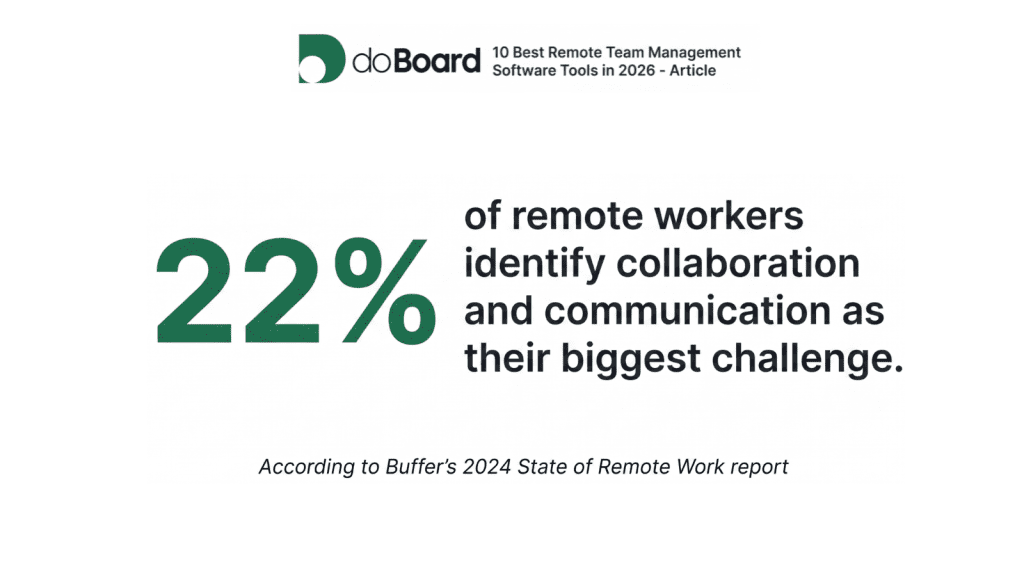
According to Buffer’s 2024 State of Remote Work report, 22% of remote workers identify collaboration and communication as their biggest challenge. A project management tool that makes ownership, status, and context visible in one place addresses this directly, replacing status meetings with visible workflows.
doBoard
Who is doBoard for? doBoard is the right fit for remote teams that need simple, customizable project management with task tracking, async work updates, workload planning, time tracking, and no per-user pricing.
doBoard is a project management tool for teams that want structure without turning daily work into a complicated admin system. It combines projects, boards, tasks, comments, calendars, workload planning, time tracking, labels, roles, and team availability in one workspace.
For remote teams, doBoard is useful because it keeps work visible without forcing people into constant meetings. Task-related communication can stay inside the task through comments, mentions, task references, cross-project linking, and notifications. This makes it easier for people to catch up later without searching through chat threads or asking for another status update.
doBoard also helps managers understand availability across locations and time zones. Teams can use calendars, working hours, workload planning, and activity visibility to see who is available, who is outside working hours, and how work is balanced across the team. The calendar can also be used to view planned tasks, shifts, duties, vacations, holidays, and role-based responsibilities.
Another important advantage is time planning. doBoard lets teams estimate time, track actual time, and plan workload based on real availability. For remote teams, this is useful because planning quality depends on feedback: if work regularly takes longer than expected, managers can adjust scope, deadlines, or capacity based on real data instead of guessing.
doBoard is also customizable without becoming too heavy. Teams can use labels, tag groups, roles, access levels, and custom workflows to adapt the workspace to their own process, terminology, priorities, or project types. At the same time, it stays simple and fast to adopt, so teams do not need weeks of setup before they can start using it.
Finally, doBoard does not charge per user. Its pricing is storage-based and includes unlimited users, projects, tasks, and boards. This can be especially useful for remote teams that work with contractors, freelancers, clients, part-time contributors, or growing teams where per-user pricing can become expensive quickly.
doBoard is a strong fit if your remote team wants more structure than a basic Kanban board, but does not want the setup burden, per-user cost, or process weight of a large enterprise project management platform.
Jira
Who is Jira for? Jira works best for larger software and product teams, especially enterprise-level teams that need structured Agile workflows, issue tracking, backlogs, advanced permissions, reporting, and process control.
Jira is one of the most established project management tools for software development teams. It works well for remote engineering organizations that need detailed Agile workflows, bug tracking, Scrum or Kanban boards, reports, permissions, and structured delivery processes.
The real tradeoff is setup cost. Jira rewards teams that already have mature development processes and enough scale to justify configuration. For smaller teams or less formal workflows, it is easy to spend more time configuring projects, boards, automations, and permissions than actually using the tool.
Jira is usually the better fit when a team already has mature development processes and enough scale to justify the setup. For simpler remote project management, it can feel too large and too process-heavy for the job.
Trello
Who is Trello for? Trello is the right starting point for small remote teams that need a simple visual task board with minimal setup time.
Trello is one of the easiest project management tools to adopt. Its board-list-card structure is simple, visual, and familiar, which makes it useful for small teams, content workflows, lightweight marketing processes, personal planning, and early-stage remote collaboration.
For remote teams, Trello works well as a starting point: it gives everyone a shared view of what is being worked on without requiring much setup. The limitation is that teams often outgrow it when they need stronger workload planning, time tracking, estimates, advanced reporting, calendar-based capacity planning, or more structured cross-project work.
Trello supports Power-Ups and paid plans, but deeper workflows often require adding and maintaining multiple extensions. It is a good choice for simple remote workflows, but teams that need workload planning, time tracking, roles, calendars, or deeper project structure may eventually need a more complete project management tool.
See our detailed comparisons:
Jira vs doBoard
Trello vs doBoard
Trello vs Jira vs doBoard
Other Project Management Tools to Consider
Other popular project management tools remote teams may consider include Asana, monday.com, and ClickUp. Asana is strong for cross-functional work and portfolio visibility, monday.com is often used for customizable work management workflows, and ClickUp is popular with teams that want many work-management features in one place.
We compare all three side by side, with prices for teams of 5, 20, and 50, in our Asana alternatives comparison.
However, for this guide, we focus on doBoard, Jira, and Trello as three different project management paths: structured but lightweight, software-development-heavy, and simple visual boards.
If pricing matters to your choice, compare project management software costs for your team size and required features.
Top Remote Team Communication Tools: Chat, Video Meetings, and Async Video
Most remote teams have too much communication, not too little. The problem is format: the same channel handles urgent questions, project decisions, and water-cooler chat, which means nothing gets the right level of attention. Good remote communication tools help teams match the format to the urgency.
The main problem is balance. If everything goes into chat, people get constant pings and lose focus. If everything becomes a meeting, calendars fill up and simple updates take too much time. The best remote team communication tools help teams choose the right format: chat for quick coordination, live calls for real-time discussion, and async video for updates that need more context than text but do not require a meeting.
Project management tools also affect communication load. If task ownership, deadlines, context, comments, updates, workload, and availability are not visible in the PM system, the team will naturally compensate with more messages and more meetings. That is why it is worth choosing a project management tool that reduces unnecessary pings and status calls instead of creating new ones. For example, doBoard supports this approach with async-friendly activity logs, smart notifications, comments, workload planning, team calendars, custom working hours, and visibility into team availability.
Team Chat and Messaging
Chat tools are best for quick questions, urgent updates, informal coordination, and team-level discussions. For remote teams, the key is not just speed, but organization: people should be able to catch up later without reading hundreds of unrelated messages.
Slack is one of the most common tools for remote team messaging. It works well for channel-based communication, quick updates, threads, huddles, and lightweight collaboration. Slack’s huddles also support quick real-time audio/video discussions directly inside channels or DMs.
Microsoft Teams is a strong option for companies already using Microsoft 365. It combines chat, meetings, calling, and collaboration in one environment, which makes it practical for larger companies and teams that want communication connected to their existing office suite.
Twist is a good less obvious option for teams that want calmer, more asynchronous communication. Instead of pushing everything into fast-moving chat, Twist is built around organized threads and positions itself as async messaging for flexible teams.
Other useful chat tools for remote teams include Google Chat, especially for Google Workspace teams, Discord for community-style or informal teams, and Pumble for teams looking for a simpler Slack alternative.
Video Meetings and Live Calls
Live video is still important for complex discussions, planning sessions, interviews, sensitive conversations, and decisions that need real-time alignment. But for remote teams, video meetings should be used intentionally. If every small update becomes a call, the team loses focus quickly.
Zoom remains one of the most established tools for video meetings, webinars, and live collaboration. It is a safe choice for teams that need reliable calls, external meetings, and advanced meeting features.
Google Meet is a natural option for teams already using Google Workspace. It works directly in the browser and connects well with Google Calendar, Docs, Sheets, and Slides.
Whereby is a smaller alternative for lightweight video calls. Its advantage is low friction: browser-based rooms, no downloads, and no login required for guests. This can be useful for client calls, interviews, quick external meetings, or teams that want simple video rooms without extra setup.
Other useful video meeting tools for remote teams include Around for lightweight team calls, Butter for workshops and facilitated sessions, and Riverside when recording quality matters more than standard meeting features.
Async Video and Screen Recordings
Async video solves a real problem: some things are too visual for text, but not important enough to schedule a call. A quick screen recording explains what a paragraph cannot, without anyone needing to clear their calendar. A manager can walk through a task, a designer can show feedback in context, or a developer can demonstrate a bug without pulling everyone into a live session.
Loom is the most recognizable tool in this category. It lets teams record and share video messages, screen recordings, walkthroughs, and explanations, which can replace some meetings and help people communicate across schedules.
Vidyard is another established option, especially for business video, screen recording, and sharing videos with colleagues, customers, or prospects. It can be useful when teams need video messaging together with hosting, organization, permissions, and analytics.
Bubbles is a smaller async collaboration option that combines screen recording with AI meeting notes, transcripts, summaries, and action items. It is relevant for teams trying to turn conversations into follow-up work and reduce the number of live meetings.
Other useful async video tools for remote teams include Tella for polished recordings, Zight for screenshots and screen recordings, and Vimeo Record for simple video messages.
What to Consider When Choosing Communication Tools
The best communication setup is usually layered: chat for quick coordination, live calls for real-time alignment, and async video for visual explanations that do not need a meeting.
But the project management layer matters too. If the PM tool does not make ownership, context, deadlines, workload, and availability clear, communication tools will become overloaded. Teams will use chat to manage tasks, calls to replace missing context, and async video to explain things that should have been visible in the workflow.
A good remote setup should prevent that. Communication tools should support the work, not become the place where all work has to be managed.
Top HR Software for Remote Teams and People Operations
Remote team management is not only about projects and communication. HR work also becomes more complex when people work from different locations: onboarding has to happen without an office, time off needs to be visible across schedules, documents must be easy to manage, and performance reviews need a clear process.
That is where HR software for remote teams helps. HR work management platforms give remote teams a central place for employee data, onboarding, time off, documents, approvals, performance processes, engagement surveys, and people analytics. Without this layer, HR work often spreads across spreadsheets, email threads, private messages, and separate files.
Research from the Owl Labs State of Hybrid Work 2023 report found that companies offering remote or hybrid flexibility see 25% lower employee turnover on average. That retention advantage depends on structured people operations: digital onboarding, time-off tracking, and performance processes that work without a physical office.
For remote teams, the most useful HR tools usually help with:
BambooHR
Who is BambooHR for? BambooHR suits small and mid-sized companies that need a straightforward HR platform for employee records, onboarding, time off, and basic performance processes.
BambooHR is one of the most established HR platforms for SMBs. It helps companies manage employee data, onboarding, time-off requests, approvals, documents, reporting, and HR workflows in one place.
For remote teams, BambooHR is useful because it reduces scattered HR admin. Instead of managing people operations through spreadsheets and manual reminders, HR teams can keep core employee information and repeatable processes in one system.
HiBob
Who is HiBob for? HiBob fits growing companies that need a broader people platform covering HR, onboarding, engagement, performance, time tracking, and analytics.
HiBob, also known as Bob, is a more advanced HR platform for companies that want HR to support employee experience, not just admin. It can help teams manage onboarding, performance reviews, surveys, people analytics, time and attendance, and internal employee data.
For remote and hybrid teams, HiBob is useful when managers need better visibility into engagement, performance, and team health across locations.
Humaans
Who is Humaans for? Humaans works best for growing distributed teams that want a modern HRIS with automation, onboarding workflows, employee data, and global team support.
Humaans is a less obvious but relevant option for remote teams. It focuses on centralized HR data, onboarding automation, workflows, approvals, and people operations. It can be a good fit for distributed teams that want a cleaner HRIS without moving into a heavy enterprise HCM system.
Other HR Tools to Consider
Other useful HR and people operations tools include Rippling, CharlieHR, Leapsome, Workleap, PeopleForce, Timetastic, Calamari, Gusto, and DocuSign.
Rippling is a broader workforce platform that combines HR with IT and finance workflows. CharlieHR is a lighter HR tool for small teams. Leapsome and Workleap are stronger for performance, engagement, feedback, and employee experience. PeopleForce covers several HR workflows in one platform. Timetastic and Calamari are more focused on leave, PTO, and absence management. Gusto is useful for payroll in US-focused teams, while DocuSign or similar tools can support contract and document signing.
One HR Platform or Several HR Tools?
Remote teams can approach HR software in two ways.
The first option is to choose one broader HR platform. For example, a growing remote company could use BambooHR, HiBob, or Rippling to manage employee records, onboarding, time off, documents, approvals, and performance in one system. This is usually easier to manage because most HR data and workflows stay together.
The second option is to build a smaller HR stack from specialized tools. For example:
• Humaans or CharlieHR for core HR data and onboarding;
• Timetastic or Calamari for PTO, holidays, and absences;
• Leapsome or Workleap for performance reviews, engagement, and feedback;
• Gusto for payroll, if the team is US-focused;
• DocuSign or PandaDoc for contracts and document signing.
The first approach is better when the team wants simplicity and fewer systems. The second works better when the company has specific HR needs and wants to choose the best tool for each workflow. Either way, the goal is the same: HR work should be structured, visible, and repeatable — not hidden in spreadsheets and private messages.
Top Documentation and Knowledge Management Tools for Remote Teams
Shared files are not documentation. A Google Drive full of undated docs, renamed copies, and folders that only make sense to whoever created them is not a knowledge base. Remote teams need information that stays findable as people join, leave, and projects change.
A basic knowledge system can be built inside Google Workspace — but only if the team sets it up with clear structure from the start. The alternative is a dedicated knowledge management tool that enforces that structure by design.
Google Workspace / Google Drive
Who is Google Workspace for? Google Workspace is the right baseline for remote teams that need familiar documentation and file sharing without adding another platform.
Google Docs, Sheets, Slides, and Shared Drives cover everyday collaboration for early and mid-sized remote teams. Shared Drives give files team-level ownership, so documents stay accessible when someone leaves or changes roles. To make it work as a real knowledge system, the setup needs discipline:
The main limitation is that Google Drive has no built-in structure enforcement. If the team doesn’t follow the rules above, Drive becomes a search problem, not a knowledge base.
Notion
Who is Notion for? Notion suits teams that want a flexible workspace combining docs, wikis, notes, light databases, and internal knowledge in one place.
Notion is useful when a team wants something more structured than Google Docs, but still flexible. It can work as a company wiki, onboarding hub, process library, meeting notes system, and internal knowledge space. Notion’s own materials describe it as a way to turn scattered company information into an organized knowledge hub and create a central company home.
For remote teams, Notion works best when documentation needs to be easy to create and connect. The tradeoff is that it still needs clear ownership and structure; otherwise, it can become messy as the workspace grows.
Slab
Who is Slab for? Slab is built for remote teams that want a focused, searchable knowledge base without turning documentation into a complex all-in-one workspace.
Slab is a less obvious but relevant option. It is built specifically as a knowledge base and wiki, with a focus on creating, organizing, and discovering knowledge across the organization.
For remote teams, Slab can be useful when the goal is not to build a full all-in-one workspace, but to make internal knowledge easier to write, organize, and search.
The main rule is simple: remote teams should not rely on memory, chat history, or meetings as their knowledge base. Google Workspace can be enough at first, especially if Shared Drives are set up properly. Dedicated tools like Notion, Confluence, or Slab become useful when the team needs stronger structure, search, ownership, and documentation habits.
Confluence
Who is Confluence for? Confluence fits larger teams, software teams, and companies that need a structured internal wiki or knowledge base with clear permissions and governance.
Confluence is a stronger fit when documentation is part of a mature process, especially in product, engineering, support, and operations teams. Atlassian describes Confluence as a tool for internal knowledge bases, intranets, and wikis that keep different teams aligned.
For remote teams, Confluence is useful when knowledge needs more governance: spaces, permissions, templates, product requirements, technical docs, and structured pages. It can feel heavier than Google Drive or Notion, but it works well when documentation has to scale.
Top Security Tools for Remote Teams: Passwords, Access, and Remote Connections
Remote teams work from different locations, networks, and devices, so security becomes part of daily operations. Companies need to control how credentials are shared, who can access which tools, and how safely people connect to company resources.
For remote teams, security tools for remote teams usually need to cover three areas: password and credential security, identity and login protection, and secure remote access.
Password and Credential Security
Remote teams should not share passwords through chats, documents, spreadsheets, or personal browsers. A password manager gives employees, contractors, and partners a safer way to access shared tools.
According to the IBM Cost of a Data Breach Report 2023, compromised or stolen credentials were the most common initial attack vector, involved in 19% of all breaches. For remote teams accessing company systems from home networks, shared Wi-Fi, and personal devices, this risk is substantially higher without a dedicated password manager and access controls in place.
1Password is one of the most practical tools for this layer. It helps companies manage access, securely share passwords, monitor usage, and generate reports from one place.
Other good options include Passbolt, Bitwarden, and Dashlane. Passbolt is especially useful for technical teams that want an open-source password manager with cloud or self-hosted options.
Identity, Login, and Access Control
As a remote team grows, manual access management becomes risky. Companies need a structured way to manage logins, enforce multi-factor authentication, and remove access quickly when someone leaves.
Okta is a strong option for this layer. Its Workforce Identity platform helps manage secure access for employees, contractors, and partners, including SSO and MFA.
Other useful options include Microsoft Entra ID and Google Workspace admin controls, especially when the company already manages users through Microsoft or Google.
Access control also matters inside daily work tools. For example, doBoard supports user access levels such as Regular, Project Manager, and Admin, so teams can keep project access aligned with team roles.
Device and Network Security
Passwords and logins are not the whole picture. Remote employees may work from home networks, coworking spaces, hotels, or public Wi-Fi, so companies also need to think about secure connections and device-level risk.
NordLayer is a useful option for this layer. Its remote access VPN creates a secure encrypted connection to company resources from any location.
Other tools to consider include JumpCloud for identity and device management, Kandji for Apple device management, and broader Google or Microsoft security controls if the team already works inside those ecosystems.
Security should not be treated as an afterthought. Every tool should have a clear owner, every employee should have the right level of access, and offboarding should remove that access on day one, not weeks later.
Conclusion
The teams that manage remote work well are not the ones using the most tools. They are the ones where everyone knows where work lives, who owns it, and how to catch up without interrupting someone. The right software stack makes that possible without becoming a job in itself.
The strongest remote setups usually combine a clear project management layer with communication, HR, documentation, and security tools that solve specific problems. A small team may start with doBoard, Google Workspace, Slack, and 1Password. A larger company may need more specialized tools for HR, identity management, knowledge bases, and secure access.
The goal is not to use more software. The goal is to reduce confusion, protect focus time, keep work visible, and make remote collaboration easier to manage.
FAQ
For remote teams, choose a tool that makes task ownership, deadlines, workload, and async updates visible without extra meetings. Look for comments tied to tasks, workload planning, and simple enough setup that the whole team will actually use it.
doBoard fits teams that need workload planning, time tracking, and no per-user pricing. Jira is better for larger software teams with mature Agile processes. Trello works well for simple visual task boards with minimal setup.
BambooHR covers core HR needs for small and mid-sized teams. HiBob suits growing companies that need broader people operations and analytics. Humaans is a modern HRIS built specifically for distributed teams.
Remote employee management software should cover project management, communication, HR workflows, documentation, and access control. A practical starting setup pairs doBoard with Slack, BambooHR, Google Workspace, and 1Password.
Use a project management tool such as doBoard, Jira, or Trello for task ownership and context. Add Slack or Teams for chat coordination, Zoom or Google Meet for live calls, and Loom for async video when a meeting is not needed.
The best setup covers project management, communication, HR, documentation, and security. For many teams, doBoard handles the project layer, paired with Slack, Google Workspace, BambooHR, and 1Password for the rest.
Give each tool a clear role and avoid workflow overlap. Keep task ownership, deadlines, and time tracking in the PM tool, use chat for quick coordination, documentation tools for long-term knowledge, and security tools for access control.
Check whether the tool plans work around actual team availability, not just task lists. The most useful remote planning tools combine tasks, calendars, workload estimates, and async updates in one place without requiring separate add-ons.