
Trello vs Jira Comparison: Which Tool Fits Your Team Better?
Jira vs Trello: Quick Answer
TL;DR: Trello wins on simplicity. Use it for visual task tracking, content workflows, and lightweight projects. Jira wins on structure. Use it when your team runs Scrum, manages backlogs, or needs sprint reporting. The right choice depends entirely on how much process your work actually needs.
Choosing between Trello and Jira usually comes down to how much structure your team needs. Trello is easier to start with and works well for visual task tracking, simple projects, and lightweight collaboration. Jira is more powerful for software and Agile teams that need backlogs, sprints, issue tracking, permissions, and reporting.
This Trello vs Jira comparison for 2026 covers pricing, features, key differences, setup, Agile support, day-to-day workflow, pros and cons, and best-fit use cases for different teams.
You’ll see where Trello works best, where Jira is stronger, and which tool makes more sense for software teams, agencies, small businesses, marketing teams, and growing operations teams.
Trello vs Jira: Quick Summary
Trello is usually the better choice for teams that want a simple, visual, easy-to-start project management tool. It works well for lightweight task tracking, content calendars, marketing workflows, client work, and small projects where flexibility matters more than process depth.
Jira is usually the better choice for teams that need more structure, especially software and Agile teams. It is stronger for backlogs, sprint planning, issue tracking, Scrum workflows, permissions, reporting, and more formal delivery processes.
The main Trello vs Jira difference is simplicity versus depth. Trello is easier to adopt and easier for non-technical users, while Jira is more powerful but requires more setup, configuration, and process discipline.
Pricing is another important difference. Both tools offer free plans, then move into per-user paid plans. That can work well early on, but costs become more important as teams add employees, contractors, clients, or cross-functional collaborators.
For most teams, the best choice depends on workflow maturity. Choose Trello if you need a flexible visual board for simple project tracking. Choose Jira if you need structured Agile project management with deeper planning, reporting, and development workflows.
If neither Trello nor Jira feels like the right fit, we briefly mention doBoard later as a third option for teams that need more structure than Trello without moving into a heavier Jira-style setup.
Trello vs Jira: Quick Decision Guide
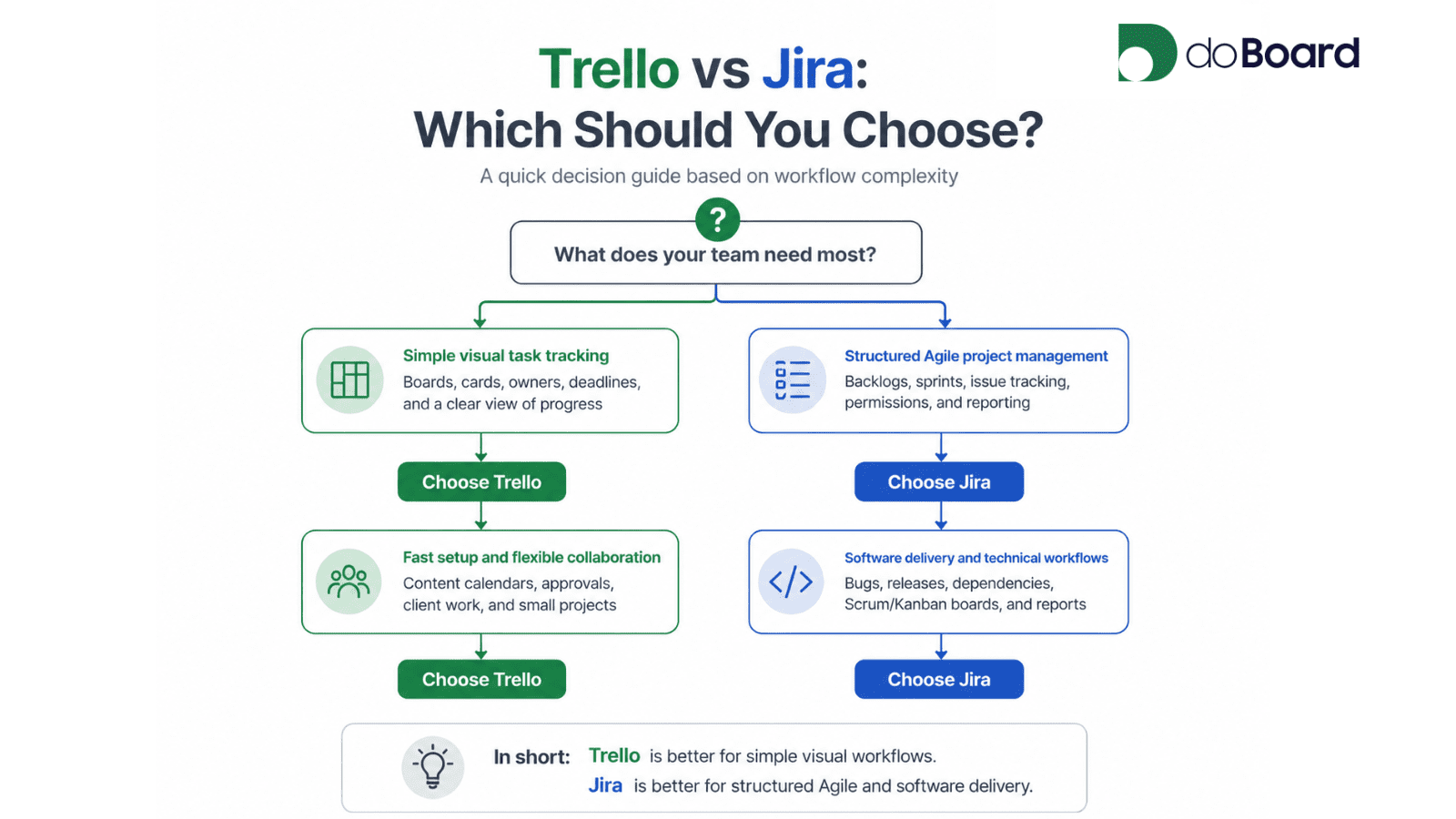
Use this flowchart to quickly decide whether your team needs a simple visual board or a more structured Agile project management system.
Trello vs Jira: Quick Comparison
Use this quick Trello vs Jira comparison table to see how the tools differ by pricing, features, setup, Agile support, workflow, and team fit.
| Category | Trello | Jira |
|---|---|---|
| Best for | Teams that need simple visual task tracking, lightweight project management, content calendars, client work, and flexible workflows. | Software and Agile teams that need structured project management, backlogs, sprints, issue tracking, permissions, and reporting. |
| Ease of setup | Easier to start with. Teams can create boards, lists, and cards quickly with little onboarding. | More powerful, but usually requires more setup, configuration, and process discipline. |
| Core structure | Boards, lists, and cards. Best when work can be managed visually in a simple flow. | Projects, issues, backlogs, boards, sprints, and workflows. Better for structured delivery processes. |
| Pricing model | Free plan for up to 10 collaborators and 10 boards per Workspace. Standard starts at $5/user/month when billed annually, or $6/user/month when billed monthly. | Free plan for up to 10 users. Standard starts at $7.91/user/month. |
| What can increase cost | Cost grows with more paid users, monthly instead of annual billing, upgrades to Premium for advanced views/AI/admin features, and some partner Power-Ups that may require separate subscriptions. | Cost grows with more users, plan upgrades to Premium for advanced planning/support/storage, billing setup, and paid Atlassian Marketplace apps billed by user count. |
| Agile support | Can support light Agile workflows, but often requires manual setup or Power-Ups. | Stronger built-in support for Scrum, backlogs, sprint planning, issue tracking, and Agile reporting. |
| Features and views | Simple board-first experience. Additional views like Calendar, Table, Timeline, Dashboard, and Map are available on higher-tier plans. | More process-driven workflow with boards, backlogs, reports, permissions, and development-focused features. |
| Reporting and visibility | Better for simple task visibility. Deeper reporting, workload management, and time tracking usually require paid features or add-ons. | Stronger for teams that need deeper planning, Agile reports, delivery visibility, and structured workflows. |
| Main pros | Easy to use, visual, flexible, fast to launch, approachable for non-technical users. | Powerful, structured, Agile-friendly, highly configurable, strong for software delivery. |
| Main cons | Can become too light as projects, teams, or reporting needs grow. Advanced views and workflows may require higher plans or Power-Ups. | Can feel heavy for teams that do not need formal Agile workflows. Setup, maintenance, and learning curve are higher. |
| Best-fit teams | Marketing teams, agencies, content teams, small businesses, and teams with simple or flexible workflows. | Software teams, product teams, engineering teams, Scrum teams, and organizations with formal delivery processes. |
| Bottom line | Choose Trello if simplicity, speed, and visual task tracking matter most. | Choose Jira if structure, Agile depth, reporting, and software delivery workflows matter most. |
Trello vs Jira: Key Differences
The biggest Trello vs Jira differences usually come down to three things: complexity, pricing, and day-to-day workflow depth.
Trello is designed to be easy to understand at a glance. Teams can create boards, lists, and cards quickly, then use them to track simple projects, content calendars, client work, or everyday team tasks.
Jira is designed for deeper planning and workflow structure. It is stronger when teams need backlogs, sprints, issue tracking, permissions, reporting, and a more formal Agile process.
The tradeoff is simple: Trello is easier to adopt, but it can become too light as projects grow. Jira is more powerful, but it usually requires more setup, configuration, and process discipline.
Trello vs Jira Pricing and Cost as Teams Grow
Trello and Jira both make it easy to start. Trello’s free plan covers up to 10 collaborators and 10 boards per Workspace, while Jira’s free plan covers up to 10 users. For very small teams, that can work well.
Trello updated its free plan in 2024 to introduce a 10-collaborator limit per Workspace, consistent with free-tier limits across other Atlassian products. Teams over that limit had their boards set to view-only until they upgraded or removed collaborators.
Once the team grows, both products move into per-user pricing. Trello Standard is listed at $5 per user per month when billed annually, while Jira Standard starts at $7.91 per user per month. Pricing can change, so it is worth checking the official pricing pages before making a final decision.
That pricing model is common in project management software, but it matters for growing teams. Costs can rise as a company adds employees, contractors, clients, or cross-functional collaborators. This is especially important when a team wants to give more people visibility into work without making every new user a budget decision.
The main Trello vs Jira pricing difference is not only the starting price, but how costs scale over time. Trello can stay affordable for simple workflows, while Jira may become more expensive as teams need more users, permissions, reporting, and Agile management features.
Trello vs Jira Standard Pricing Example
Example based on listed Standard plan starting prices: Trello Standard at $5/user/month when billed annually and Jira Standard at $7.91/user/month. Actual billing may vary by plan, billing cycle, region, and future pricing changes.
| Team size | Trello Standard | Jira Standard |
|---|---|---|
| 10 users | $50/month | $79.10/month |
| 20 users | $100/month | $158.20/month |
| 50 users | $250/month | $395.50/month |
Beyond the Standard plan price, costs can also increase if a team moves to higher-tier plans, adds paid Power-Ups or Marketplace apps, chooses monthly instead of annual billing, or needs more advanced views, automation, reporting, permissions, or support.
Trello vs Jira Setup and Customization
Trello is usually easier to set up. Teams can create a board, add lists, create cards, assign work, and start tracking tasks quickly. This makes Trello a strong fit when the team wants a visual workflow with minimal onboarding and does not need much upfront process design.
Jira usually requires more setup because it is built around a more structured model. Teams work with projects, issues, boards, backlogs, workflows, permissions, and reports. That structure is useful for teams that already think in those terms, especially software and Agile teams.
The tradeoff is setup speed versus control. Trello is faster to adopt and easier for non-technical users. Jira gives teams more control over workflows, permissions, and reporting, but it can feel like more system than a simple team needs on day one.
Trello vs Jira Features, Views, and Collaboration
Trello’s core experience is visual. Teams work on boards and move cards through lists or stages. The layout is intuitive enough for most people to understand quickly, which makes Trello useful for marketing workflows, content calendars, client work, lightweight project tracking, and other flexible team processes.
Trello also offers additional ways to view work, including Calendar, Table, Timeline, Dashboard, Map, and Workspace views. Boards are available to all users, while additional views require a Premium or Enterprise account.
Jira’s day-to-day workflow is more process-driven. Teams can organize work through projects, issues, backlogs, boards, sprints, reports, permissions, and development-focused workflows. This is useful when work needs more structure, traceability, and reporting.
The tradeoff is flexibility versus workflow depth. Trello is easier to use for simple collaboration and visual task tracking. Jira is stronger when teams need a more formal process, clearer issue history, stronger reporting, and structured delivery workflows.
Trello vs Jira Agile Support, Backlogs, and Sprint Planning
Trello can support light Agile workflows, especially when a team wants a simple board for tasks, priorities, and delivery stages. Teams can create lists for workflow steps, use cards for work items, and adapt the board to a simple Scrum or Kanban-style process.
Jira is stronger for teams that need formal Agile project management. It is built for backlogs, sprint planning, issue tracking, Scrum and Kanban boards, reports, permissions, and structured development workflows. That makes it a better fit for software teams that already work with Scrum or need deeper delivery visibility.
The tradeoff is simplicity versus Agile depth. Trello can work well for lightweight Agile or informal sprint planning. Jira is usually the better fit when Agile processes are central to how the team plans, tracks, and reports work.
Trello vs Jira for Project Management
When people compare Trello vs Jira for project management, the best choice depends on how much structure the team needs. Trello works well for lightweight project management: simple boards, task owners, due dates, checklists, comments, and visual progress tracking. It is a strong fit when teams need an easy way to organize work without building a formal project management process.
Jira is usually stronger for structured project management, especially in software development. It supports backlogs, issues, sprints, Scrum and Kanban boards, reports, permissions, and more detailed workflow control. That makes Jira a better fit when project management means planning releases, tracking development work, managing dependencies, and reporting progress across a more formal delivery process.
The main difference is that Trello behaves more like a flexible task board, while Jira behaves more like a structured project management system. Trello is easier to adopt and easier for cross-functional teams to understand. Jira gives teams more control and visibility, but it also requires more setup and process discipline.
If neither approach feels quite right, doBoard can be considered as a third option for teams that need more project structure than Trello, but do not want a heavier Jira-style setup. For a deeper product-specific comparisons, read the full doBoard vs Trello comparison and doBoard vs Jira comparison.
Trello vs Jira Pros and Cons
Trello: Pros and Cons
Trello Pros
Trello Cons
Jira: Pros and Cons
Jira Pros
Jira Cons
Trello vs Jira Pros and Cons Summary
The main takeaway is that Trello’s biggest strength is simple visual project management. It works well when teams need a clear board, task owners, deadlines, and an easy way to see what is in progress. Its limits usually appear when projects need stronger reporting, workload visibility, advanced planning, dependencies, or a more formal delivery process.
Jira’s biggest strength is structured project management for Agile and software teams. It works well when teams need backlogs, sprints, issue tracking, permissions, reporting, and more control over delivery workflows. Its limits usually appear when the team only needs a simple way to organize tasks, collaborate, and track progress.
In practice, the better choice depends on what would create a bigger problem for your team: outgrowing a simple board too quickly or adding more process than the work actually needs.
Trello vs Jira for Small Businesses
For small businesses, Trello vs Jira is mostly a question of process. Trello works well when the team needs a simple way to assign tasks, track deadlines, discuss work, and see what is moving. It is especially useful when the team does not need backlogs, sprint planning, issue types, or detailed reporting.
A practical example: a 3-person marketing agency running a limited number of client campaigns will likely thrive on Trello. Boards per client, cards per deliverable, and the whole team can see what is moving without any onboarding. That same agency at 15 people, managing retainers, dev projects, and client approvals across teams, usually starts hitting Trello’s limits. Work fragments across boards, reporting becomes manual, and new people struggle to find context. That is the inflection point where Jira’s structure starts making sense, or where a lighter structured tool becomes a better fit than either.
Jira makes more sense for a small business with structured software or technical workflows. If the team runs Scrum, manages backlogs, tracks bugs, plans releases, or needs detailed issue tracking and reporting, Jira can support that process better than a simple board.
In broad terms, very small businesses often lean toward Trello because it is easier to keep simple. Jira is more common when a company is larger, more technical, or ready to manage a more complex process because that structure brings real value.
If Trello looks too basic, but Jira feels like more system than you need, doBoard is built specifically for small businesses in that middle space.
It gives small teams flexible workflows, Agile-friendly planning, workload visibility, and time tracking without a long setup. You can add the whole team from $5/month, with core features included and pricing that only grows when you need more storage.
Trello vs Jira for Agencies and Client Work
For agencies, Trello can work well when projects are simple, visual, and easy for clients or non-technical teammates to follow. It is useful for campaign work, content workflows, approvals, creative tasks, website updates, and small client projects where everyone needs a clear view of what is in progress.
Jira is a better fit for technical agencies that operate more like software delivery teams. If an agency manages backlogs, bugs, sprints, releases, or engineering workflows for clients, Jira gives that work more structure and traceability.
For agencies, the best choice depends on how technical the work is and how much client visibility the team needs. Trello is usually enough for lightweight client work and creative workflows. Jira makes more sense when client projects require structured development, issue tracking, and formal delivery processes.
Trello vs Jira for Software Teams
Trello can work for software teams when the workflow is light: simple task tracking, roadmap notes, small internal projects, or early-stage development coordination. It can help a small team see what is planned, what is being worked on, and what needs review.
Jira is usually the stronger fit for software teams that already use Scrum, Kanban, backlogs, sprints, issues, and reports. It gives engineering and product teams more control over how work is planned, tracked, reviewed, and shipped.
The main question is how much structure the software team needs. But there’s a practical rule of thumb: if your team has a backlog, Trello is the wrong tool. The moment sprint planning and bug tracking enter the picture, Jira’s setup overhead pays for itself within a few weeks. Trello can support lightweight development coordination, but teams that outgrow it mid-project usually wish they had started in Jira.
Trello vs Jira for Marketing Teams
Trello is usually a better fit for marketing teams that need a simple visual workflow. It works well for content calendars, campaign tasks, approvals, launch checklists, design requests, and recurring marketing work. The board format is easy for writers, designers, marketers, freelancers, and stakeholders to understand without much setup.
Jira can work for marketing teams inside larger organizations that already use Atlassian across product, engineering, and operations. It may also help when marketing work is closely tied to software releases, product launches, bug fixes, or technical delivery. But for many marketing teams, Jira adds more structure than the workflow actually needs.
For marketing teams, the key question is whether the work needs a flexible campaign board or a more formal delivery process. Trello is usually enough for simple campaign and content coordination. Jira makes more sense when marketing work is part of a larger technical workflow with dependencies, releases, and reporting needs.
Trello vs Jira for Growing Teams
When a team is small, Trello can be enough: everyone sees the board, tasks are easy to follow, and there is not much to configure. As the team grows, this can get harder. There may be more projects, more owners, more deadlines, more clients, and more people who need visibility.
Jira becomes useful when growth also brings more structured work: multiple teams, technical dependencies, sprint planning, issue tracking, permissions, and reporting. It gives teams more control, but it also takes more setup and ongoing management.
The question is where the team starts to feel friction. Trello may feel too simple if people lose track of work across boards. Jira may feel too heavy if the team spends too much time managing workflows, fields, permissions, and reports.
If Trello is too simple and Jira is too much, doBoard can scale as your work becomes more complex. You can start with a simple setup, adapt workflows as your process grows, and add unlimited users and projects as your team expands. Pricing stays based on storage, not the number of people you invite.
See how doBoard supports growing teams below ↓
When to choose Trello
Choose Trello when your team needs a simple visual workspace for tasks, deadlines, owners, and project status. It works best when the workflow is easy to map on a board and people need to understand it quickly without much setup.
Trello is a good fit for content calendars, campaign tasks, approvals, lightweight client work, small internal projects, and teams that do not need detailed reporting or formal Agile planning.
It is usually the better choice when speed and simplicity matter more than process control. If the team starts needing workload visibility, dependencies, advanced planning, or more structured reporting, Trello may need extra setup, Power-Ups, or workarounds.
When to choose Jira
Choose Jira when your team already needs a structured process for planning, tracking, and reporting work. It is strongest when projects involve backlogs, sprints, issue tracking, Scrum or Kanban boards, permissions, and detailed delivery reporting.
Jira is usually the better fit for software, product, and technical teams that manage bugs, releases, dependencies, or formal Agile workflows. It also makes sense when the company is ready to invest time in setup, configuration, and ongoing process management because that structure brings real value.
It is less suitable when the team only needs a clear task board, simple collaboration, and quick visibility into what is happening. In that case, Jira can add more process than the work actually needs.
Trello vs Jira: Which Is Better?
Neither Trello nor Jira is universally better for every team. Trello is better when work can stay simple: tasks, owners, deadlines, comments, and visual progress. Jira is better when work needs more structure: backlogs, sprints, issue tracking, permissions, reporting, and formal Agile workflows.
For very small teams or simple projects, Trello is often the easier choice. For larger, more technical, or process-heavy teams, Jira usually makes more sense.
The best choice depends on what your team needs more: a simple visual way to manage work or a more structured system for planning, tracking, and reporting delivery.
When Neither Trello nor Jira Fits Your Team
Some teams do not fit neatly into Trello or Jira. They need more structure than a basic board, but they do not want a tool that takes a long time to set up, manage, and maintain.
doBoard is built for teams in that gap.
You can start with a simple setup, then adjust workflows as projects, clients, and internal processes become more complex. Labels, tag groups, calendars, time tracking, workload planning, and sprint planning are built into the product.
The pricing model is different too. doBoard lets you add unlimited users, projects, and tasks, with pricing based on storage instead of seats. That matters when the team grows: adding more people should not automatically make the software bill grow with every new teammate, client, or contractor.
To compare the product directly, see the full doBoard vs Trello comparison and doBoard vs Jira comparison.
To see what is included, review doBoard’s features.
You can also check doBoard’s pricing.
Where doBoard Works Best
doBoard works best for small businesses and growing teams that need more structure than a simple board, but do not want a heavy setup. It is strongest when teams need flexible workflows, built-in planning, time tracking, workload visibility, calendars, and unlimited users without per-seat pricing.
Where doBoard May Not Be the Best Fit
doBoard may not be the best fit if your team needs a classic Kanban board view, a large marketplace of integrations, or advanced enterprise automation. In those cases, Trello or Jira may be a better match depending on how much structure the team needs.
FAQ
Trello is better for simple visual task tracking, lightweight projects, and teams that want fast setup. Jira is better when teams need backlogs, sprints, issue tracking, permissions, reporting, and structured Agile workflows.
Jira can be too complex if a small business only needs simple task ownership, deadlines, and collaboration. It makes more sense when the team already uses Scrum, manages bugs or releases, or needs detailed issue tracking and reporting.
Both tools offer free plans and then move into per-user pricing. Trello Standard starts at $5/user/month when billed annually, while Jira Standard starts at $7.91/user/month. The real cost depends on team size, billing cycle, plan upgrades, and add-ons.
Trello can work for lightweight software coordination, roadmap notes, and small internal projects. Jira is usually stronger for software teams that need sprint planning, bug tracking, release planning, and Agile reporting.
Teams that need more structure than Trello but less setup than Jira can compare doBoard, especially if they want unlimited users, built-in planning, time tracking, workload visibility, and storage-based pricing.
Trello is usually better for very small businesses that need simple task tracking, deadlines, comments, and visual project boards. Jira makes more sense when a small business already runs structured software or technical workflows, such as Scrum, bug tracking, release planning, or detailed reporting.
