
Solutions · Small agencies
Project Management Software for Small Agencies: $5/Month for Everything
- Unlimited users
- Unlimited projects
- Unlimited clients
- Every feature on every plan
Get client work in order today. Grow without a bigger software bill.
Give each client a separate workspace, track hours in every task, and see who has time this week. Teammates, freelancers, and clients join at no extra cost, and only storage changes the price.
7-day free trial. No credit card required.
$5/mo
for the whole agency
Unlimited
users, clients, and projects
7 days
free trial, no credit card
2 min
to set up a workspace
Short answer
What is the best project management software for a small agency?
For a small agency, the best project management software keeps each client’s work separate, tracks time, shows who has capacity, and doesn’t charge more for every new teammate, contractor, or freelancer. doBoard does all four for $5/month: unlimited users, projects, and client workspaces, with time tracking and workload planning on every plan. Only storage changes the price.
4/5 from WP Mayor, with 5/5 for pricing · 5/5 on Trustpilot from a team that adds contractors and clients at no extra cost · Built by CleanTalk
Why small agencies switch
What gets harder as a small agency grows
The problemEvery teammate, contractor, or freelancer you add means another paid seat.
With doBoardUnlimited users for $5/month. Add people for one project and remove them when it ends.
The problemWork for different clients gets mixed in one shared space.
With doBoardA separate workspace for each client, with its own projects, people, and access.
The problemYou find out someone is overloaded when a deadline slips.
With doBoardCalendars show each person’s planned and available hours before you commit.
The problemHours leak, and nobody sees a project going over its estimate.
With doBoardTime tracking in every task, with estimated and actual hours by project.
The problemFeedback and decisions are scattered across email and chat.
With doBoardComments, mentions, and files stay with the task. Spotfix turns comments on a web page into tasks.
The problemAgency suites charge per seat for CRM, invoicing, and modules a small agency doesn’t use.
With doBoardProjects, tasks, time tracking, and workload planning on one $5 plan.
What’s included
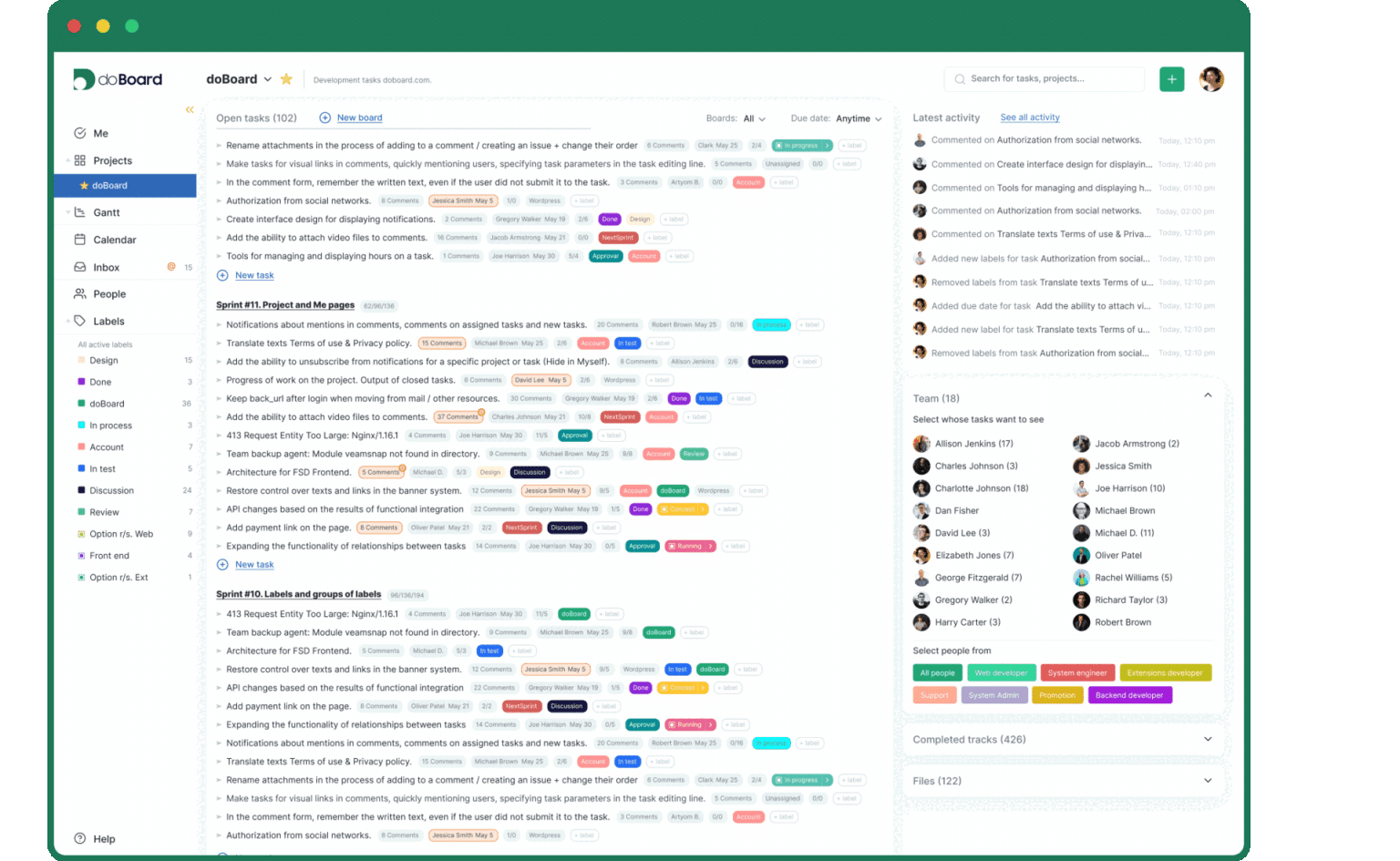
Client projects, hours, and workload in one workspace
Every plan includes every feature. No add-ons, no tiers, no seat bundles.
A workspace for each client
Create a Company for every client with its own projects, people, access settings, and time logs. Keep it internal, or invite the client to their own workspace or to one project.
How Companies work →Unlimited users with clear access
Invite teammates, freelancers, and contractors at no extra cost. Roles and project permissions decide what each person can see and do.
Access levels →Time tracking by project
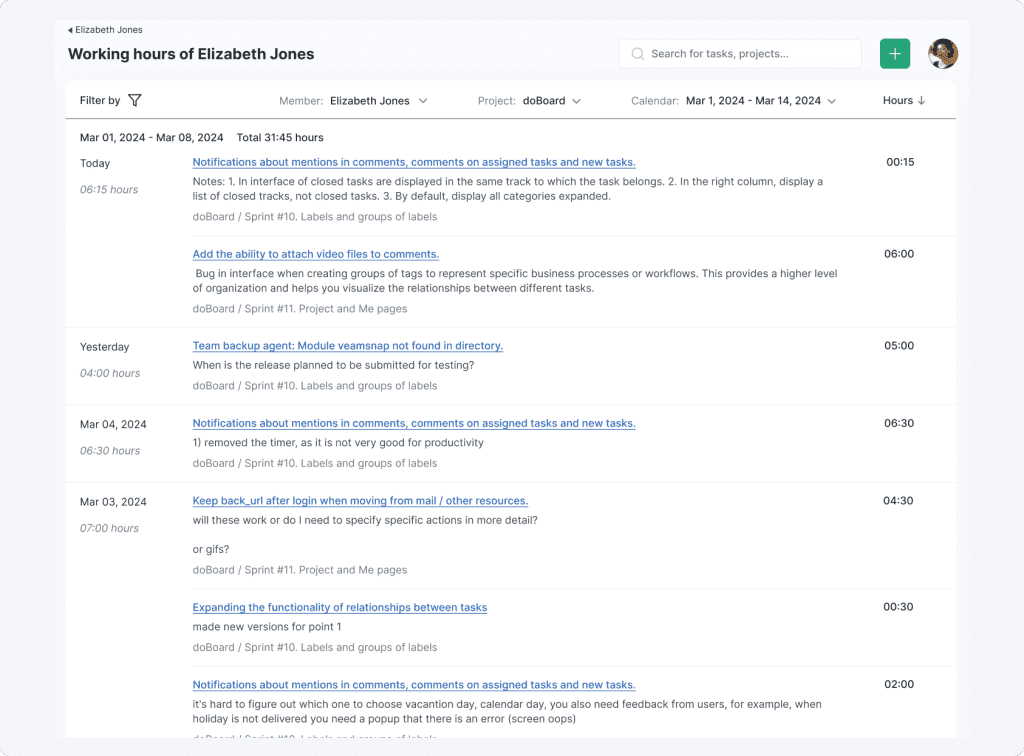
Log time in task comments, compare estimated and actual hours, and review hours by project, teammate, or period.
Time tracking →Workload and available hours
See each person’s planned and free hours by day in the task calendar, or the load of everyone on a board at once. The team calendar shows who is off, on a shift, or on duty.
Workload planning →Your own stages and labels
Name stages your way with labels and tag groups, from brief to client review to done. doBoard can set due dates from the planned time of each stage.
Labels and tag groups →Comments right on the page
With Spotfix, clients and teammates review a website, a landing page, or a blog post: they highlight text or an image and leave a comment, and it becomes a task with a screenshot.
Explore Spotfix →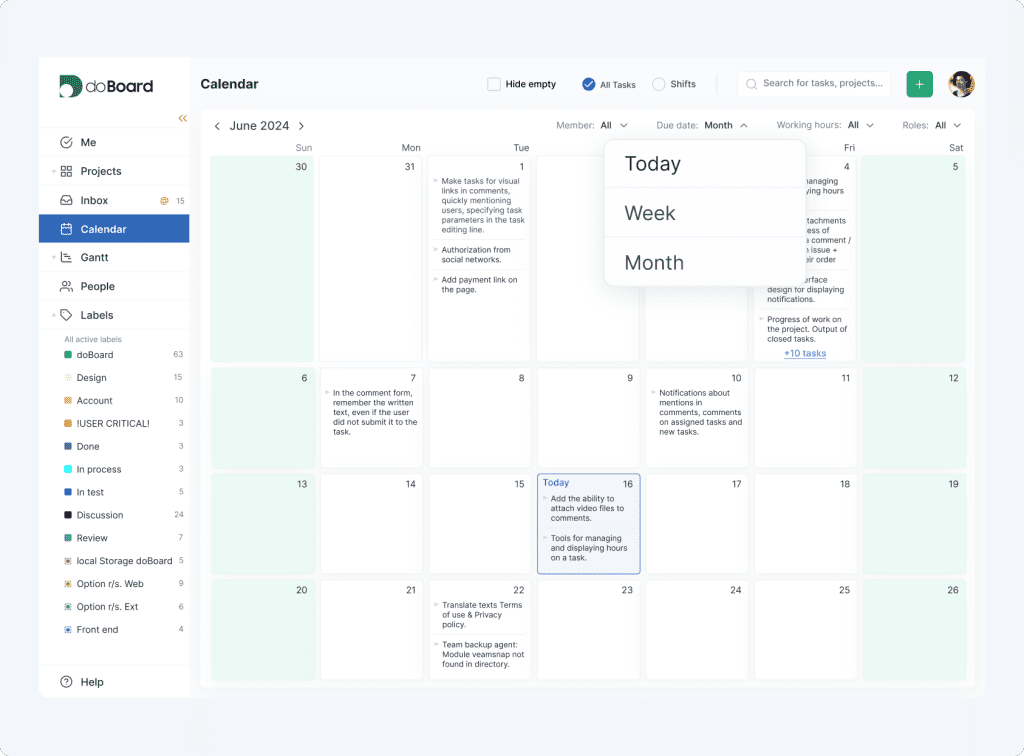
How it works
A week at a small agency, run in doBoard
The same weekly rhythm works for three clients or thirty.
Monday
Plan the week by available hours
The task calendar shows each person’s planned and free hours, so new client requests land where there is room.
Every day
Work in tasks, not in chat
Comments, mentions, files, and time logs stay with the task, so a freelancer who joins midweek has the full context.
When a new client signs
Set up a new client in minutes
Create a Company for the client, add a project, and invite everyone who will work on it, freelancers included. The price stays the same.
Friday
Check the hours
Compare estimated and actual hours by project and teammate, and see where an estimate ran over before you quote the next job.
Who it’s for
Flexible enough for any kind of small agency
Agency management suites are usually built for larger firms: they bundle CRM, invoicing, and budgeting, charge for every seat, and take time to set up. A small agency often needs a lighter tool that the whole team actually uses. doBoard covers the daily client work, and your own stages and labels make it fit a marketing, design, content, web, or consulting agency.
One price for the whole team$5/month for the whole agency, instead of a per-seat bill that grows with every teammate, contractor, or freelancer.
Your process, not a vendor’sName stages your way and change them when your services change, from a website build to a content retainer or an ad campaign.
Ready the same dayCreate a workspace for each client and invite the team in minutes. No consultant, no modules to switch on, no setup project.
Marketing agenciesCampaign tasks with labels by channel, and launch dates in the task calendar.
Creative and design studiosStages from brief to client review, with files and comments in each task.
SEO and content agenciesContent plans in the task calendar, and Spotfix comments on staged and live pages.
Web and digital agenciesSpotfix for website feedback and a GitHub integration for development tasks.
Web agencies →Software development agenciesSprints, estimates, and Planning Poker for product work.
Software agencies →ConsultanciesA workspace for each client and hours tracked by project.
Pricing
One price for the whole agency
Teammates, freelancers, and clients are all included. Add as many people, projects, and client workspaces as the work needs: the price stays the same.
Storage is the only thing that changes the price
5 GBStart here
$5/mo
Unlimited users and projects
20 GB
$15/mo
Same everything, more files
75 GB
$50/mo
Same everything, more files
250 GB
$150/mo
Same everything, more files
750 GB
$300/mo
Same everything, more files
What’s the catch?
There isn’t one. You pay for storage, not for people: every plan includes every feature and unlimited users, and the price changes only when you need more than 5 GB. There’s no free tier for paying customers to cover and no big ad budget built into the price. doBoard is made by CleanTalk, a website security company trusted by more than 1.1 million websites.
7-day free trial. No credit card required.
Comparison
How doBoard compares with popular agency tools
ClickUp, monday.com, Asana, and Teamwork.com charge per user, so every teammate, contractor, or freelancer you add raises the bill. Basecamp charges by the number of projects. Here is what an agency of 10 teammates and 5 freelancers pays per month, billed annually.
| Tool | Pricing | 10 + 5 freelancers, per month | Clients and guests | Time tracking | Workload and capacity |
|---|---|---|---|---|---|
| doBoard | One price for the whole account: $5/month. More storage from $15/month | $5 for all 15 people | Unlimited users at no extra cost. Invite a client to their Company or to one project | Every plan | Every plan: each person’s planned and free hours, by date in the task calendar, and for everyone on a board |
| ClickUpClickUp cost calculator → | Per user: Unlimited $7, Business $12. Free Forever plan | $105 on Unlimited$180 on Business | Guests on every plan; guest permissions on paid plans | Built in from Unlimited | Workload view on Business; a trial on lower plans |
| monday.commonday.com cost calculator → | Per seat: Basic $9, Standard $12, Pro $19. At least 3 seats, sold in fixed seat steps. Free for up to 2 seats | $135 on Basic$285 on Pro | Free viewers from Basic; guest access from Standard, 3 guests free | From Pro | Workload view on Pro; resource management on Enterprise |
| AsanadoBoard vs Asana → | Per user: Starter $10.99, Advanced $24.99. Free Personal plan for up to 2 users | $164.85 on Starter$374.85 on Advanced | Unlimited free guests on paid plans | From Advanced; a paid add-on on Starter | Project and portfolio workload on Advanced; capacity planning on Enterprise |
| Teamwork.com | Per user: Basics $9.99 (3 users minimum), Accelerate $24.99 (5 users minimum). Free for up to 5 users | $149.85 on Basics$374.85 on Accelerate | Free client users, up to 5 active projects each, and free collaborators | Time logs on every plan; billable time and reports from Basics | Workload and capacity planning from Accelerate |
| BasecampdoBoard vs Basecamp → | Flat price by number of projects: Freelancer $25 (3), Studio $59 (10), Pro $99 (25), Unlimited $299. Free for 1 project | $59 up to 10 projects$99 up to 25 projects | Clients and guests count as users; unlimited users from Studio | Every plan | Not listed on the pricing page |
How we counted: monthly prices, billed annually, for 15 paid members: 10 teammates and 5 freelancers who work in tasks every day. For each tool, the cheapest paid plan and the plan that adds time tracking or workload planning. Some tools let you add freelancers as guests with limited access, for less or for free, and clients usually join as guests. Basecamp prices depend on the number of projects, not users. ClickUp is rolling out new plans (Core $9, Business $17, Max $100 per user per month, billed annually), and some workspaces see those prices. Sources: the pricing pages of ClickUp, monday.com, Asana, Teamwork.com, and Basecamp, checked on October 18–19, 2026; doBoard is our product. Prices and plans can change and may vary by region.
7-day free trial. No credit card required.
Our story
Built by a team that works in doBoard every day
doBoard is made by CleanTalk Inc. Our own development, support, operations, product, and marketing teams plan and track their work in doBoard, so new features are tested on real projects first. We built it for teams that need clear tasks, built-in time tracking, and realistic plans, without paying per seat.
80–100%
of planned sprint work finished by the deadline after our team moved to doBoard
Before the move: 55–65%
CleanTalk team data, shared by CEO Denis Shagimuratov
Reviews
What users and reviewers say about doBoard
TrustpilotRating: 5/5
“doBoard works well for us because it skips the complicated features we don’t actually need. We can add as many contractors and clients as we want without the price going up, which makes collaboration a lot easier. For what we pay, we are getting a lot more out of the tool than we initially expected. We didn’t expect to get resource planning and time tracking for the whole team for so little money.”
Read the full review on Trustpilot
WP MayorRating: 4/5, pricing 5/5
“Overall, doBoard offers a clean, intuitive interface for managing to-do lists and projects. While it lacks some advanced features, it’s simple to use and affordable. This makes it an appealing option if you need to boost your productivity and ‘shake up’ your task management.”
Read the full review on WP Mayor
TrustpilotRating: 4/5
“Simple project management tracker, and that’s what I like about it. We needed,
– A simple tool that can be easily used by the whole team without special training/onboarding, and for it to be fast and easy to set up.
– Not expensive and with pricing that is not confusing.
That’s what doBoard is.”
Read the full review on Trustpilot
CareerAddictRating: 4.2/5
“Our small, remote team found doBoard particularly useful, with the calendar, activity log and mention functionalities standing out to us the most. That’s because those features kept everyone on the same page while reducing the need for (our often lengthy) IM exchanges. (Me and my editor were especially grateful for the less frequent pings!)”
Read the full review on CareerAddict
TrustpilotRating: 5/5
“Well, this product, I think, is better than analogues. I’ve used Trello and it’s good in the beginning, but as I needed more tools for stable work, the price was too high for that. Also, Trello has very isolated communication and no built-in task time tracking. But DoBoard has everything I need.”
Read the full review on Trustpilot
TechWibe
“Small teams are where DoBoard runs smoothly, but mid-sized businesses can probably also use it. If your team runs remotely, DoBoard won’t become irrelevant; in fact, the features and services are made for remote collaborations.”
Read the full review on TechWibe
FAQ
Questions small agencies ask
Short answers on clients, pricing, and setup.
What should a small agency look for in project management software?
Four things: a separate space for each client, time tracking by project, a view of who has free hours, and pricing that doesn’t grow with every user you add, whether a teammate, a contractor, or a freelancer. doBoard covers all four for $5/month, with unlimited users, projects, and client workspaces and every feature on every plan.
How much does agency project management software cost?
Most tools charge per user. For an agency of 10 teammates and 5 freelancers, ClickUp costs $105–$180/month, Asana $164.85–$374.85/month, and Teamwork.com $149.85–$374.85/month, billed annually. doBoard costs $5/month for the whole agency, with unlimited users and every feature; only storage changes the price, from $15/month for 20 GB.
Can we add freelancers and contractors without paying more?
Yes. doBoard has no user limit: teammates, freelancers, and contractors join at no extra cost, and roles and project permissions decide what each person can see. Add someone for one project and remove them when it ends.
Can we keep each client’s work separate?
Yes. Create a Company for each client, with its own projects, people, and access settings, and switch between clients in one account. A client you invite to their Company or to one project doesn’t see your other clients.
Can we track time by client or by project?
Yes, by project. For each project, doBoard shows how many tasks are planned and closed and how many hours are planned and spent, for the whole project and for each teammate.
How do we see who has time for a new project?
Open the task calendar: it shows each person’s planned tasks and free hours by day, with their work hours and time zone. On a board, you see the planned hours of everyone working on it at once. The team calendar shows who is on vacation, on a shift, or on duty, so you can give a client a date your team can meet.
Can clients leave feedback on websites and content?
Yes, with Spotfix, which comes with doBoard. Add it to a website, a landing page, or a blog post: clients and teammates highlight text or an image and leave a comment, and each comment becomes a task with a screenshot.
Does doBoard work for marketing, creative, and SEO agencies?
Yes. You set up stages with labels and tag groups, so campaigns, design projects, and content plans run in the same workspace, with time tracking and calendars. Web and software agencies also get Spotfix, the GitHub integration, and sprints with Planning Poker.
Does doBoard include invoicing or a CRM?
No. doBoard covers projects, tasks, time tracking, and workload planning. Keep invoices in your accounting tool and use time reports by project to prepare them.
Why does doBoard cost only $5/month, and what’s the catch?
There is no catch. doBoard charges for storage, not for people: every plan includes every feature and unlimited users, projects, and tasks, and the price changes only when you need more than 5 GB. There is no free tier for paying customers to cover and no big advertising budget built into the price. doBoard is made by CleanTalk, a website security company trusted by more than 1.1 million websites.
Does doBoard have a free plan or a free trial?
doBoard has a 7-day free trial with every feature, and no credit card is needed. There is no free plan: after the trial, doBoard costs $5/month for unlimited users and projects. Registered nonprofits can apply for a free one-year license through the doBoard Nonprofit Impact Program.
How quickly can a small agency get started?
In about 2 minutes. Sign up, create a Company for each client, add projects, and invite your team. There are no modules to configure, so a freelancer can start on tasks the same day.
$5/month · every feature · unlimited users
Grow your agency, not your software bill
Get client work in order today: unlimited users, clients, and projects for $5/month, with time tracking, workload planning, and Spotfix included.
Start my free trialYour workspace is ready in about 2 minutes. 7-day free trial, no credit card.