
Best Asana Alternatives in 2026: 10 Tools Compared for Price and Features
October 15, 2026

Updated October 2026. Prices were checked on each vendor’s pricing page on . Prices change often, so check the vendor’s page before you buy.
Disclosure: doBoard is our product, so it comes first. Every section also says when another tool is the better choice.
Quick answer: what are the best Asana alternatives in 2026?
The best Asana alternatives in 2026 are doBoard for teams that want time tracking and workload planning without paying per seat ($5 per month for unlimited users), ClickUp for an all-in-one workspace, monday.com for visual workflows without code, Trello for simple Kanban boards, and Jira for software teams. For comparison, a 20-person team pays $219.80 per month for Asana Starter and $499.80 for Asana Advanced, billed annually.
Need a free plan? ClickUp Free Forever has no member limit (60 MB of storage), Trello is free for up to 10 collaborators, and Jira is free for up to 10 users.
Best Asana alternative by team need
Start with the problem you want to solve. Each pick links to its full review below.
Every feature for one flat price
doBoard →$5 a month for unlimited users, with time tracking, workload planning, and sprints on every plan.
Tasks, docs, and chat in one app
ClickUp →One customizable workspace; time tracking from $7 per user.
Visual workflows without code
monday.com →Color-coded boards, automations, and dashboards that non-technical teams learn quickly.
The simplest Kanban board
Trello →Cards and lists with almost no setup; free for up to 10 collaborators.
Resource planning across departments
Wrike →Workload charts, time tracking, and approvals on the Business plan.
Docs and wikis first, tasks second
Notion →Pages, wikis, and databases you can turn into boards and timelines.
Client communication at a fixed price
Basecamp →Message boards, chat, and check-ins; unlimited users from $59 a month.
Software teams running Scrum or Kanban
Jira →Backlogs, sprints, and boards; free for up to 10 users.
Spreadsheet-style project plans
Smartsheet →Grid, Gantt, and board views for teams that already plan in spreadsheets.
Agencies that bill clients for time
Teamwork.com →Time tracking on every plan, client users, budgets, and invoices.
Why teams look for Asana alternatives
Asana is a strong tool for planning work across teams, and for many companies it is still the right choice. Teams usually start looking elsewhere for one of these reasons.
The bill grows with every seat
Starter costs $10.99 and Advanced $24.99 per user per month, billed annually. Above five users, Asana adds seats in steps of 5 (and of 10 above 30 users), so a 12-person team pays for 15 seats.
Time tracking and workload sit on Advanced
Built-in time tracking and workload management come with Advanced. On Starter, time tracking is a paid add-on. For 20 people, Advanced costs $499.80 per month, billed annually.
The free plan is for one or two people
Asana’s free Personal plan lets 2 users collaborate, so any team of three or more pays from the first day.
How we evaluated these Asana alternatives
We picked the tools that appear most often in Asana comparisons and that teams actually shortlist, plus doBoard, which we make. Then we checked each one the same way.
- Prices from official pricing pages: checked on October 14, 2026, in US dollars, with annual billing where it exists.
- Team cost for 5, 20, and 50 people: using each vendor’s own seat rules: Asana’s seat steps, monday.com’s seat buckets and AI credits, Jira’s annual user tiers, the user caps on Wrike Team and Smartsheet Pro, and Basecamp’s project limits. Every teammate counts as a paid user; free guests and viewers are left out.
- Features from pricing pages and help docs: time tracking, workload or capacity planning, Gantt or timeline views, Kanban boards, and free plan limits.
- User feedback from G2 and Capterra: summarized in our own words, with links to the full reviews.
- Our own experience: the CleanTalk team, which builds doBoard, ran its work on Basecamp for seven years before moving to doBoard. For the other tools, we rely on their documentation and verified user reviews.
Disclosure: doBoard is our product, so it comes first. Every section also says when another tool is the better choice.
Asana alternatives at a glance
| Tool | Best for | Pricing model | Starts at | 20 people / mo | Free plan | Time tracking | Workload |
|---|---|---|---|---|---|---|---|
| doBoard | Every feature at one flat price | Flat, by storage | $5/mo (5 GB) | $5 | No (7-day trial) | Every plan | Every plan |
| ClickUp | All-in-one workspace | Per user | $7/user (Unlimited) | $140 | Unlimited members | Unlimited and up | Business and up |
| monday.com | Visual workflows | Per seat, seat buckets | $9/seat (Basic) | $190 | Up to 2 seats | Pro and up | Pro and up |
| Trello | Simple Kanban boards | Per user | $5/user (Standard) | $100 | 10 collaborators | Power-Ups only | No |
| Wrike | Cross-team resource planning | Per user, annual | $10/user (Team) | $500 | Unlimited users, 2 GB | Business and up | Business and up |
| Notion | Docs-first teams | Per member | $10/member (Plus) | $200 | One person | No | No |
| Basecamp | Client communication | Flat, by projects | $25/mo (3 projects) | $59 | 1 project, 5 users | Pro ($99/mo) and up | No |
| Jira | Software teams | Per user, annual tiers | $950/yr (10 users) | $204.17 | Up to 10 users | Basic logging | Premium |
| Smartsheet | Spreadsheet-style plans | Per member | $9/member (Pro) | $380 | No | No | Business and up |
| Teamwork. | Agencies and client work | Per user, seat minimums | $9.99/user (Basics) | $199.80 | 5 users, 5 projects | Every plan | Accelerate and up |
| Asana (baseline) | Cross-team planning | Per user, seat steps | $10.99/user (Starter) | $219.80 | Up to 2 users | Advanced (add-on on Starter) | Advanced and up |
Prices per month in US dollars, billed annually where the vendor offers it. “20 people / mo” is the cheapest paid plan that fits a 20-person team: Business for Wrike and Smartsheet, Studio with 10 active projects for Basecamp. ClickUp: classic plans (see the ClickUp section). Checked .
What a team of 5, 20, or 50 pays
A price per user hides the rules that decide your real bill: minimum seats, seat buckets, user tiers, and project limits. Here is the cheapest paid plan for each team size, per month.
| Tool and plan | 5 people | 20 people | 50 people |
|---|---|---|---|
| doBoard$5 plan, 5 GB | $5 | $5 | $5 |
| AsanaStarter | $54.95 | $219.80 | $549.50 |
| ClickUpUnlimited (classic) | $35 | $140 | $350 |
| monday. | $45 | $190 | Quote |
| TrelloStandard | $25 | $100 | $250 |
| WrikeTeam; Business from 16 users | $50 | $500 | $1,250 |
| NotionPlus | $50 | $200 | $500 |
| Basecamp3, 10, and 30 active projects | $25 | $59 | $299 |
| JiraStandard, annual tier | $79.17 | $204.17 | $404.17 |
| SmartsheetPro; Business from 11 members | $45 | $380 | $950 |
| Teamwork. | $49.95 | $199.80 | $499.50 |
What changes the bill
- Asana adds seats one at a time up to 5 users, then 5 at a time up to 30 and 10 at a time up to 100.
- monday.com sells seats in buckets of 3, 5, 10, 15, 20, 25, 30, and 40; above 40 seats you need a quote. Paid plans now include AI credits that add $10, $20, or $30 a month on Basic, Standard, and Pro; for teams of up to 10 seats, the pricing page shows a discount of the same amount.
- Jira bills annual plans by user tier: 1–10 users pay $950 a year on Standard, 16–25 users $2,450, and 26–50 users $4,850. A team of up to 10 can also use Jira Free.
- Wrike Team stops at 15 users and Smartsheet Pro at 10 members, so larger teams move to Business.
- Basecamp prices by active projects, not people. We assume 3, 10, and 30 active projects for teams of 5, 20, and 50.
- ClickUp is rolling out new plans, so the price depends on your workspace. The table uses the classic plans; on the new ones, Core costs $9 and Business $17 per user.
- doBoard charges only for storage: $5 for 5 GB, $15 for 20 GB, $50 for 75 GB.
Time tracking and workload planning for 20 people
The cheapest plan in each tool that includes both built-in time tracking and a workload or capacity view, per month, billed annually.
Not built in: Basecamp has time tracking from Pro ($99 a month) but no workload view; Smartsheet tracks workload on Business ($380 for 20 members) but has no native time tracking; Trello and Notion have neither without add-ons. On ClickUp’s new plans, Business costs $340 for 20 people.
Want to plug in your own team size, guests, and storage? Use our project management software cost calculator.
Pay $5 a month for the whole team
doBoard includes time tracking, workload planning, sprints, and Planning Poker on every plan, with unlimited users. Compare it with Asana feature by feature, or try it with your own projects.
No credit card required.
Asana (baseline): pricing and limits in 2026
- Plans
- Personal (free, 2 users), Starter, Advanced, Enterprise, Enterprise+
- Price
- Starter $10.99 and Advanced $24.99 per user per month, billed annually ($13.49 and $30.49 billed monthly)
- 20 people
- $219.80 on Starter, $499.80 on Advanced
- Time tracking
- Advanced and up; a paid add-on on Starter
- Workload
- Advanced and up
- Views
- List, board, and calendar on every plan; timeline and Gantt from Starter
Asana is the benchmark for this list. It is strong at planning work across teams: portfolios, goals, reporting dashboards, rules and forms, and integrations such as Salesforce, Tableau, and Power BI on Advanced. Most of the limits that make teams look around come down to plan levels and price:
- Timeline and Gantt views, dashboards, and unlimited automations start on Starter.
- Portfolios, goals, workload management, and built-in time tracking start on Advanced.
- Paid plans start at 2 seats, and above 5 users seats are added in steps.
- In organizations, guests are free and don’t take a seat.
Prices: Asana pricing, checked .
1. doBoard: best for teams that want every feature for a flat $5 a month
- Best for
- Small and growing teams, agencies, and development teams that need time tracking and workload planning
- Price
- $5 per month for 5 GB of storage, unlimited users; $15 for 20 GB
- 20 people
- $5 a month
- Free plan
- No; 7-day trial without a card, free year for registered nonprofits
- Time tracking
- Every plan
- Workload
- Every plan: available hours and sprint capacity
- Kanban / Gantt
- No Kanban view; Gantt chart in development
Asana vs doBoard: when doBoard is the better choice
doBoard costs the same $5 a month whether five or fifty people use it, and every plan includes every feature. That changes the math most for teams that need what Asana keeps on Advanced: time tracking in task comments, estimates against actual hours, each teammate’s available hours, and sprint capacity. For 20 people, that is $5 a month in doBoard and $499.80 on Asana Advanced, billed annually.
It also suits teams that work with clients and contractors. Separate Companies keep each client’s work apart, and adding outside people doesn’t change the price.
Pros of doBoard
- One flat price for unlimited users and projects; only storage changes the price
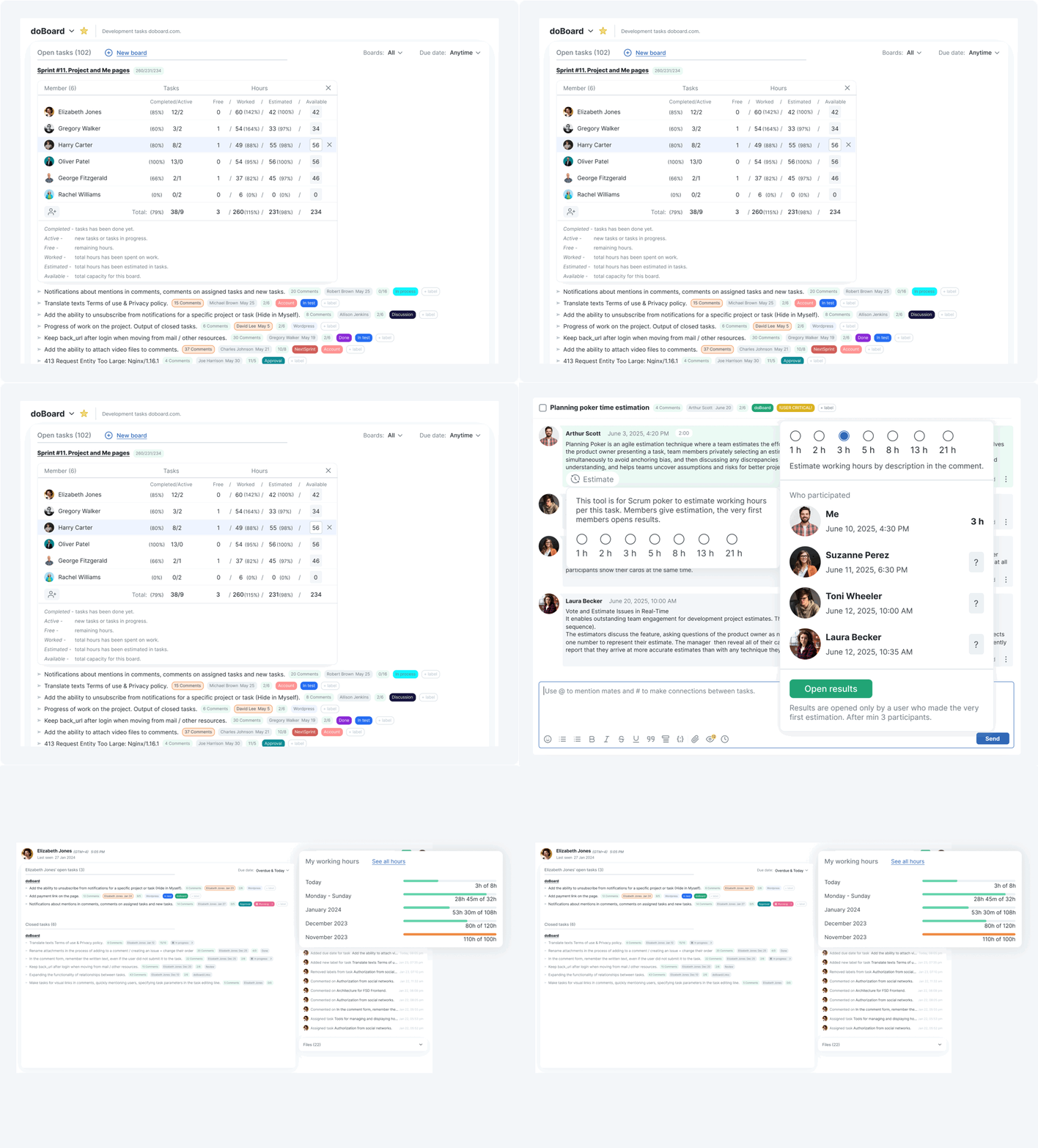
- Time tracking, estimates, available hours, and sprint capacity on every plan
- Sprints, backlogs, and Planning Poker built in
- Companies for clients, plus Spotfix website feedback and a GitHub integration
Cons of doBoard
- No Kanban board view yet, and the Gantt chart is still in development
- The $5 plan includes 5 GB of storage; 20 GB costs $15 a month
- No free plan, only a 7-day trial
- Fewer ready-made integrations than Asana: no Salesforce or Power BI connectors
What independent reviewers say
Reviewers mostly point to the price and the short learning curve. A 2026 Trustpilot review highlights adding contractors and clients without the price going up, plus resource planning and time tracking for the whole team; another calls doBoard a simple tool the whole team can use without training. WP Mayor rated it 4 out of 5 and 5 out of 5 for pricing, and CareerAddict gave it 4.2 out of 5 for small remote teams.
Why we built doBoard: seven years on Basecamp
doBoard started inside CleanTalk. Our own team ran on Basecamp for seven years: it was fast, and new teammates could start without training. What we kept missing was room for content on larger screens, links between tasks in different projects, and labels to organize work beyond projects and to-do lists. So we built doBoard for our own development, support, operations, product, and marketing teams.
80–100%
of planned sprint work finished by the deadline after the move to doBoard
Before the move: 55–65%
CleanTalk team data, shared by CEO Denis Shagimuratov
Choose doBoard if…
- you want one predictable bill as the team grows
- you need time tracking and workload planning without moving to a top plan
- you run sprints and estimate work together
- you can work without a Kanban board for now
Prices: doBoard pricing, checked .
Try doBoard with your own projects
Every feature and unlimited users from the first day. The 7-day trial needs no credit card.
No credit card required.
2. ClickUp: best for an all-in-one workspace
- Best for
- Teams that want tasks, docs, chat, and dashboards in one app
- Price
- Classic plans: Unlimited $7 and Business $12 per user per month, billed annually ($10 and $19 monthly)
- 20 people
- $140 on Unlimited; $240 on Business with workload
- Free plan
- Free Forever: unlimited members, 60 MB of storage
- Time tracking
- Unlimited plan and up
- Workload
- Business and up
- Kanban / Gantt
- Board view on every plan; Gantt from Unlimited
Asana vs ClickUp: when ClickUp is the better choice
ClickUp gives you more building blocks than Asana: docs, chat, whiteboards, custom fields, and many views in one workspace. It is also cheaper at the entry level, and native time tracking comes with Unlimited at $7 per user, while Asana keeps it on Advanced at $24.99. The trade-off is setup: ClickUp can do almost anything, so someone has to decide how your team will use it.
Prices at the time of publication. ClickUp is rolling out new plans. Its help center says they go to workspaces created after the launch, all Free Forever workspaces, and some paid ones, while existing customers keep their plan and price. On October 14, 2026, clickup.com showed some visitors the classic plans (Unlimited $7, Business $12) and others the new ones (Core $9, Business $17, Max $100 per user per month, billed annually). This article uses the classic prices; check which plans your workspace sees before you buy.
Pros of ClickUp
- Tasks, docs, chat, whiteboards, and dashboards in one place
- Custom statuses, fields, and views: list, board, calendar, Gantt
- Native time tracking from the entry paid plan
- Free Forever plan with no member limit
Cons of ClickUp
- Steep learning curve; the interface can feel cluttered
- Workload view and advanced time tracking need Business
- Free Forever includes only 60 MB of storage
- Two price lists during the plan rollout
What users say (G2 and Capterra)
Reviewers on G2 and Capterra praise the all-in-one approach, flexible customization, and how much it can do once it is set up. The most common complaints are a steep learning curve, a cluttered interface, missing or limited features, and slow loading on large boards.
Choose ClickUp if…
- you want to replace several apps with one
- someone on your team enjoys configuring tools
- you need a free plan for a large team and 60 MB of files is enough
Prices: ClickUp pricing, checked .
3. monday.com: best for visual workflows without code
- Best for
- Teams across departments that want colorful boards and automations
- Price
- Basic $9, Standard $12, Pro $19 per seat per month, billed annually ($12, $14, $24 monthly), plus AI credits
- 20 people
- $190 on Basic; $410 on Pro with time tracking and workload
- Free plan
- Up to 2 seats and 3 boards
- Time tracking
- Pro and up
- Workload
- Pro and up (Workload View)
- Kanban / Gantt
- Kanban on every plan; timeline and Gantt from Standard
Asana vs monday.com: when monday.com is the better choice
monday.com is easier to read at a glance than Asana: color-coded boards, simple automations, and dashboards that non-technical teams pick up quickly. Asana goes deeper on goals and portfolios. On price, the two are close at the entry level, but monday.com sells seats in buckets, adds AI credits to paid plans, and keeps both time tracking and workload on Pro: $410 a month for 20 seats, billed annually, against $499.80 on Asana Advanced.
Pros of monday.com
- Visual boards and dashboards that are easy to scan
- No-code automations and integrations: 250 actions a month on Standard, 25,000 on Pro
- Works well across marketing, operations, and sales teams
- Free plan for up to 2 seats
Cons of monday.com
- Time tracking and Workload View only on Pro
- Seats come in buckets; above 40 seats you need a quote
- AI credits are part of the bill on paid plans
- Timeline and Gantt views start on Standard
What users say (G2 and Capterra)
Reviewers on G2 and Capterra like the flexible boards, the automations, and the clean design. Complaints focus on seat minimums and rising costs, key features in higher tiers, AI credit limits, and a feature-dense interface for new users.
Choose monday.com if…
- your teams are non-technical and want a visual tool
- you rely on automations and integrations
- you stay under 40 seats or are ready to talk to sales
Prices: monday.com pricing, checked .
4. Trello: best for simple Kanban boards
- Best for
- Small teams that want a simple shared board
- Price
- Standard $5 and Premium $10 per user per month, billed annually ($6 and $12.50 monthly)
- 20 people
- $100 on Standard
- Free plan
- Up to 10 collaborators and 10 boards per workspace
- Time tracking
- Not built in; available through Power-Ups
- Workload
- No
- Kanban / Gantt
- Boards on every plan; timeline, table, and calendar views on Premium
Asana vs Trello: when Trello is the better choice
Trello is the fastest way to get a team onto a shared board: cards, lists, and drag and drop, with almost no setup. Compared with Asana it is much lighter. There is no built-in time tracking or workload view, and extra views such as timeline and table need Premium. For small teams that live on a Kanban board, that simplicity is the point.
Pros of Trello
- Very easy to start with, even for non-technical teams
- Free for up to 10 collaborators
- Power-Ups add calendars, time tracking, and integrations
- Low price: $5 per user on Standard
Cons of Trello
- No native time tracking or workload planning
- Timeline, table, and dashboard views require Premium
- Boards get crowded on large projects
- Free plan: 10 boards per workspace and 10 MB per file
What users say (G2 and Capterra)
Reviewers on G2 and Capterra praise ease of use, visual organization, and real-time collaboration. The usual complaints are limited features beyond boards, basic reporting, cluttered boards on big projects, and noisy notifications.
Choose Trello if…
- you want the simplest possible board
- your team is small or works on short projects
- you don’t need time tracking or capacity planning in the same tool
Need time tracking and sprints next to your boards? See how doBoard compares with Trello →
Prices: Trello pricing, checked .
5. Wrike: best for resource planning across departments
- Best for
- Larger teams and PMOs that need resource planning and approvals
- Price
- Team $10 per user per month (2–15 users), Business $25 (5–200 users), billed annually
- 20 people
- $500 on Business
- Free plan
- Unlimited users, 2 GB of storage, no automations
- Time tracking
- Business and up
- Workload
- Business and up: resources view and workload charts
- Kanban / Gantt
- Kanban on every plan; Gantt from Team
Asana vs Wrike: when Wrike is the better choice
Wrike is built for structured work at scale: custom workflows, request forms, proofing and approvals, and resource views with workload charts on Business. It reports in more depth than Asana’s lower plans, but it costs more and takes longer to set up. The Team plan stops at 15 users, so most growing teams land on Business at $25 per user, billed annually.
Pros of Wrike
- Workload charts, time tracking, and approvals on Business
- Dynamic Gantt chart from the Team plan
- Strong dashboards and visibility across teams
- Free plan with unlimited users
Cons of Wrike
- Team plan only up to 15 users
- Business and higher are annual-only
- Steep learning curve and a busy interface
- Advanced capacity planning needs Pinnacle (price on request)
What users say (G2 and Capterra)
Reviewers on G2 and Capterra like the customizable workflows and dashboards, clear task tracking, and visibility across teams. They mention a steep learning curve, a cluttered interface, costs that rise with higher tiers, and slow dashboards.
Choose Wrike if…
- you manage many projects across departments
- you need approvals and proofing in the same tool
- you have an admin to set it up
Prices: Wrike pricing, checked .
6. Notion: best for docs-first teams
- Best for
- Teams that keep docs, wikis, and tasks together
- Price
- Plus $10 and Business $20 per member per month, billed annually ($12 and $24 monthly); Notion AI on Business
- 20 people
- $200 on Plus
- Free plan
- For one person; teams of 2 or more get a limited block trial
- Time tracking
- No
- Workload
- No
- Kanban / Gantt
- Board and timeline views in databases
Asana vs Notion: when Notion is the better choice
Notion is a workspace for documents first: pages, wikis, and databases that you can shape into task lists, boards, or timelines. Teams that write a lot often prefer it to Asana. As a project tool, though, you build the structure yourself, and there is no built-in time tracking or workload view.
Pros of Notion
- Docs, wikis, and tasks in one place
- Flexible databases with many views and templates
- Notion AI included on Business
- Free guests: 10 on Free, unlimited on paid plans
Cons of Notion
- No time tracking or workload planning
- Project management takes setup and team conventions
- Slows down on large databases
- AI features only on Business, at $20 per member
What users say (G2 and Capterra)
Reviewers on G2 and Capterra praise the flexible workspace, notes and tasks in one place, and the templates. Complaints include a learning curve, slow performance with big databases, a weaker mobile app, no offline mode, and limited depth for complex projects.
Choose Notion if…
- your work starts with documents
- you want a wiki and light task tracking in one tool
- you don’t need time or capacity tracking
Prices: Notion pricing, checked .
7. Basecamp: best for client communication at a fixed price
- Best for
- Agencies and teams that talk to clients a lot
- Price
- Freelancer $25 per month (3 projects, up to 20 users), Studio $59 (10 projects), Pro $99 (25 projects), Unlimited $299 billed annually
- 20 people
- $59 on Studio with 10 active projects
- Free plan
- 1 project, up to 5 users
- Time tracking
- Pro and Unlimited
- Workload
- No
- Kanban / Gantt
- Card Tables (Kanban) on every plan; no Gantt chart
Asana vs Basecamp: when Basecamp is the better choice
Basecamp replaces a lot of email: message boards, group chat, to-dos, schedules, docs, and automatic check-ins, with clients invited into the same project. It now charges flat monthly prices by the number of active projects instead of per user, which is often cheaper than Asana for larger teams. It is lighter on planning: there is no Gantt chart or workload view, and time tracking starts on Pro at $99 a month.
Our experience: our team used Basecamp for seven years. It was fast, and new people needed no training. What we missed was room for content on larger screens, links between tasks across projects, and labels to organize work beyond projects and to-do lists.
Pros of Basecamp
- Flat prices, with unlimited users from Studio
- Built for client communication: message boards, Campfire chat, check-ins
- Simple and quick to learn
- Card Tables for Kanban-style processes
Cons of Basecamp
- Active project caps on every plan below Unlimited ($299 a month)
- Time tracking only on Pro and Unlimited
- No Gantt chart or workload planning
- Clients and guests count as users on Free and Freelancer
What users say (G2 and Capterra)
Reviewers on G2 and Capterra like the simple interface, communication in one place, and predictable pricing. They point to limited customization and advanced features, no native Gantt charts or task dependencies, and trouble finding older threads and files.
Choose Basecamp if…
- you work with clients and want them in the same space
- you prefer messages and check-ins to boards and charts
- you run up to 10 active projects, or 25 on Pro
Want Basecamp’s simplicity with sprints and time tracking on every plan? See doBoard vs Basecamp →
Prices: Basecamp pricing, checked .
8. Jira: best for software teams running Scrum or Kanban
- Best for
- Software and IT teams
- Price
- Standard $9.70 and Premium $19.60 per user per month billed monthly; annual plans by user tier ($950 a year for up to 10 users on Standard)
- 20 people
- $204.17 a month on Standard ($2,450 a year)
- Free plan
- Up to 10 users, 2 GB of storage
- Time tracking
- Basic time logging on work items; timesheet apps such as Tempo need a paid plan
- Workload
- Capacity management on Premium
- Kanban / Gantt
- Backlog, board, and timeline views on every plan
Asana vs Jira: when Jira is the better choice
Jira is the standard tool for software teams: backlogs, sprints, Scrum and Kanban boards, and issue workflows, with Atlassian’s Rovo AI on paid plans. It is more technical than Asana and usually feels heavy for marketing or operations teams. Small development teams can start free with up to 10 users; cross-team planning and capacity management need Premium.
Pros of Jira
- Built for Scrum and Kanban, with backlogs and sprints
- Free for up to 10 users
- Integrates with developer tools such as Confluence and Git hosting
- Time logging on work items on every plan
Cons of Jira
- Steep learning curve and a lot of configuration
- Feels heavy for non-technical teams
- Capacity and cross-project planning need Premium
- Annual plans are priced by user tier, so 16 and 25 users pay the same
What users say (G2 and Capterra)
Reviewers on G2 and Capterra like the flexible workflows, issue tracking, and Agile boards. The common complaints are a steep learning curve, a complex interface, admin overhead, and slowdowns on large backlogs.
Choose Jira if…
- you build software and run sprints
- you need issue tracking tied to your code
- someone on the team can administer it
Want sprints and Planning Poker without the setup? See doBoard vs Jira →
Prices: Jira pricing, checked .
9. Smartsheet: best for spreadsheet-style project plans
- Best for
- PMOs and teams that think in spreadsheets
- Price
- Pro $9 per member per month for 1–10 members, Business $19 from 3 members, billed annually ($12 and $24 monthly)
- 20 people
- $380 on Business
- Free plan
- No, a trial only
- Time tracking
- No native time tracking; Resource Management is a separate product
- Workload
- Business and up
- Kanban / Gantt
- Gantt and board (card) views on every plan
Asana vs Smartsheet: when Smartsheet is the better choice
Smartsheet looks like a spreadsheet and works like a project tool: rows become tasks with owners, dates, dependencies, and a Gantt view. Teams that already plan in Excel adapt quickly. Compared with Asana it is stronger on grid-based planning and reports, but there is no free plan, Pro stops at 10 members, and time tracking needs a separate product.
Pros of Smartsheet
- Familiar spreadsheet interface
- Grid, Gantt, board, and calendar views
- Free contributors who can view, comment, and fill in forms
- Automations and dashboards for many projects
Cons of Smartsheet
- No free plan
- Pro is limited to 10 members; Business needs at least 3
- No native time tracking
- Learning curve for advanced features
What users say (G2 and Capterra)
Reviewers on G2 and Capterra value the spreadsheet feel, automation, and real-time collaboration. They mention a steep learning curve, high cost for small teams, licensing limits on outside collaborators, and a limited mobile app.
Choose Smartsheet if…
- your team already plans in spreadsheets
- you need Gantt charts and reports across many projects
- outside collaborators only need to view, comment, or fill in forms
Prices: Smartsheet pricing, checked .
10. Teamwork.com: best for agencies that bill clients for time
- Best for
- Agencies and service teams
- Price
- Basics $9.99 per user per month (3 users minimum), Accelerate $24.99 (5 minimum), billed annually
- 20 people
- $199.80 on Basics; $499.80 on Accelerate with workload
- Free plan
- Up to 5 users and 5 projects
- Time tracking
- Every plan, including Free
- Workload
- Accelerate and up
- Kanban / Gantt
- Board, Gantt, list, and table views on every plan
Asana vs Teamwork.com: when Teamwork.com is the better choice
Teamwork.com is built around client work. Time tracking is on every plan, Basics includes unlimited client users, and Accelerate adds workload planning, budgets and retainers, and invoices built from logged time. Asana is more general-purpose; Teamwork.com is the closer fit when hours turn into invoices.
Pros of Teamwork.com
- Time tracking on every plan, including Free
- Unlimited client users from Basics
- Workload planner, budgets, and invoicing on Accelerate
- Gantt and board views on every plan
Cons of Teamwork.com
- Seat minimums: 3 on Basics, 5 on Accelerate
- Workload planning starts at $24.99 per user
- The feature set can feel overwhelming at first
- Free plan limited to 5 users and 5 projects
What users say (G2 and Capterra)
Reviewers on G2 and Capterra like the clean interface, task, time, and resource management in one place, and responsive support. Complaints include an overwhelming feature set at first, frequent interface changes, limited email integration, and mobile app limits.
Choose Teamwork.com if…
- you run an agency and bill by the hour
- clients need access to their projects
- you want budgets and profitability next to tasks
Prices: Teamwork.com pricing, checked .
Free Asana alternatives and their real limits
Most tools on this list have a free plan, but each one caps something different: people, storage, boards, or projects. Here is what you get for $0.
| Tool | Free plan | Main limit |
|---|---|---|
| ClickUp | Free Forever | Unlimited members, 60 MB of storage, 5 Spaces |
| Trello | Free | Up to 10 collaborators and 10 boards per workspace, 10 MB per file |
| Jira | Free | Up to 10 users, 2 GB of storage |
| Wrike | Free | Unlimited users, 2 GB of storage, no automations |
| Teamwork. | Free Forever | Up to 5 users and 5 projects, 100 MB; time tracking included |
| Basecamp | Free | 1 project, up to 5 users, 1 GB |
| monday.com | Free | Up to 2 seats and 3 boards |
| Notion | Free | For one person; teams of 2 or more get a limited block trial |
| Asana | Personal | Up to 2 users |
| Smartsheet | None | Trial only |
| doBoard | None | 7-day trial; registered nonprofits can get a free one-year license |
Free plan limits, checked .
The right free plan depends on what you will hit first: the number of people (Trello, Jira, Teamwork.com, monday.com, Asana), storage (ClickUp, Wrike), or projects (Basecamp, Teamwork.com). When you outgrow it, compare what the paid plan costs for the whole team, not just for the first seat. Registered nonprofits can apply for a free doBoard license through the Nonprofit Impact Program.
How to choose the right Asana alternative
If you need…
- a lower bill for a growing team: compare whole-team prices. doBoard ($5 for any team size) and Basecamp (from $25, by number of projects) don’t charge per user.
- time tracking and workload planning: check the plan that includes both: every plan in doBoard, Business in ClickUp, Pro in monday.com, Premium in Jira, Accelerate in Teamwork.com, and Business in Wrike.
- a tool for software teams: shortlist Jira, and doBoard if you want sprints and Planning Poker without the setup.
- a place to work with clients: look at Teamwork.com, Basecamp, and doBoard with its separate Companies.
- docs more than tasks: try Notion.
- the simplest possible board: start with Trello.
Before you switch
- Count everyone who needs to edit, including contractors and clients.
- Find the plan that has the features you use every week, not the cheapest plan.
- Check seat rules: minimums, buckets, steps, user tiers, and annual-only plans.
- Run a trial on a real project for at least a week before you move everything.
To compare several tools for your exact team, use the project management software cost calculator.
Shortlisting doBoard?
See how doBoard and Asana compare on price, time tracking, workload, and sprints, or start a trial with your own projects.
No credit card required.
Final recommendation
For most small and mid-size teams leaving Asana because of the price, doBoard is the cheapest way to keep time tracking and workload planning: $5 a month for the whole team. Choose ClickUp if you want an all-in-one workspace and a large free plan, monday.com for visual workflows across departments, Trello for simple boards, Jira for software teams, and Teamwork.com for agencies that bill hours.
If you rely on portfolios, goals, and reporting across many departments, Asana is still a strong choice.
Try doBoard with your team
Unlimited users, every feature, and one price: $5 a month. Set up a project in about two minutes.
Start my free trial7-day free trial. No credit card required.
FAQ
What is the best alternative to Asana?
It depends on why you are leaving. For a lower bill with time tracking and workload planning, doBoard costs $5 a month for unlimited users. ClickUp is the strongest all-in-one alternative, monday.com the most visual, Trello the simplest, and Jira the best fit for software teams.
What is the cheapest Asana alternative?
doBoard: $5 a month for the whole team on the 5 GB plan, with every feature. Among tools that charge per user, Trello Standard ($5 per user) and ClickUp Unlimited ($7 per user, classic plan) cost the least, billed annually.
Is there a free alternative to Asana?
Yes. ClickUp Free Forever has no member limit (60 MB of storage), Trello is free for up to 10 collaborators, Jira for up to 10 users, Wrike Free has unlimited users and 2 GB of storage, and Teamwork.com is free for up to 5 users and 5 projects.
Which Asana alternatives don’t charge per user?
doBoard and Basecamp. doBoard costs $5 a month for unlimited users and charges more only for extra storage. Basecamp charges by active projects: $25 a month for 3 projects (up to 20 users), $59 for 10, $99 for 25, and $299 a month, billed annually, for unlimited projects.
Which Asana alternative has built-in time tracking?
doBoard and Teamwork.com include time tracking on every plan. ClickUp has it from Unlimited ($7 per user), Wrike from Business, monday.com on Pro, Basecamp on Pro ($99 a month), and Jira offers basic time logging on every plan. In Asana, it comes with Advanced or as a paid add-on on Starter.
Who are Asana’s main competitors?
The tools most often compared with Asana are ClickUp, monday.com, Trello, Wrike, Notion, Basecamp, Jira, Smartsheet, and Teamwork.com. doBoard competes on price: one flat rate for unlimited users.
How much does Asana cost for a team of 20?
$219.80 a month on Starter and $499.80 on Advanced, billed annually ($10.99 and $24.99 per user). Billed monthly, it is $269.80 and $609.80. Above 5 users, Asana adds seats in steps of 5, so 12 people pay for 15 seats.
Is ClickUp cheaper than Asana?
Yes. On ClickUp’s classic plans, Unlimited costs $7 and Business $12 per user, billed annually, against $10.99 and $24.99 in Asana. Workspaces that get ClickUp’s new plans see Core at $9 and Business at $17. ClickUp also includes time tracking on its entry paid plan.
Is monday.com cheaper than Asana?
At the entry level, yes: Basic costs $9 per seat, billed annually. But monday.com sells seats in buckets, adds AI credits to paid plans, and keeps time tracking and workload on Pro, which costs $410 a month for 20 seats against $499.80 for Asana Advanced.
What is the best Asana alternative for software teams?
Jira, if you need issue tracking tied to code and full Scrum or Kanban workflows; it is free for up to 10 users. doBoard suits smaller development teams that want sprints, Planning Poker, time tracking, and a GitHub integration for a flat $5 a month.
Why does doBoard cost only $5 a month?
doBoard charges for storage, not people. Every plan includes every feature and unlimited users, and the price changes only when you need more than 5 GB ($15 for 20 GB). It is made by CleanTalk, a website security company trusted by more than 1.1 million websites.
